





 Make us preferred on Google
The rapid advancement of Artificial Intelligence (AI) has introduced powerful new tools for traders. Unlike traditional rule-based bots that follow static instructions, AI-powered systems can analyze complex market data, adapt to changing conditions, and identify subtle patterns that humans might miss. This has led many traders to explore building AI crypto trading bots to gain a competitive edge.
In this step-by-step tutorial, we'll build a functional AI crypto trading bot in Python. We will use the CoinGecko API for comprehensive market and on-chain data and an OpenAI large language model (LLM) as the decision-making core.

What Is an AI Crypto Trading Bot?
An AI crypto trading bot is software that automates cryptocurrency trades by utilizing artificial intelligence to analyze market data and make informed decisions.
Unlike traditional algorithmic trading bots, which rely on fixed "if-then" rules, AI bots can learn from data, adapt to new conditions, and detect nuanced patterns that rigid systems might miss.
Key advantages include:
- Dynamic logic: AI bots can dynamically adjust strategies by modifying the prompt, thereby enhancing testing speed and reducing iteration time.
- 24/7 operation: They run continuously without fatigue, monitoring markets around the clock.
- No emotions: Trades are based on analysis rather than fear or greed, reducing impulsive errors.
- Handling complex variables: Beyond basic indicators like RSI or MACD, they can incorporate diverse factors such as on-chain metrics, sentiment, or emerging trends for more informed strategies.
How Does an AI Trading Bot Work?
AI trading bots work by ingesting market data and using an AI engine to evaluate it for trade opportunities, in accordance with a well-crafted user prompt.
At a high level, an AI trading bot's workflow breaks down into four main stages:
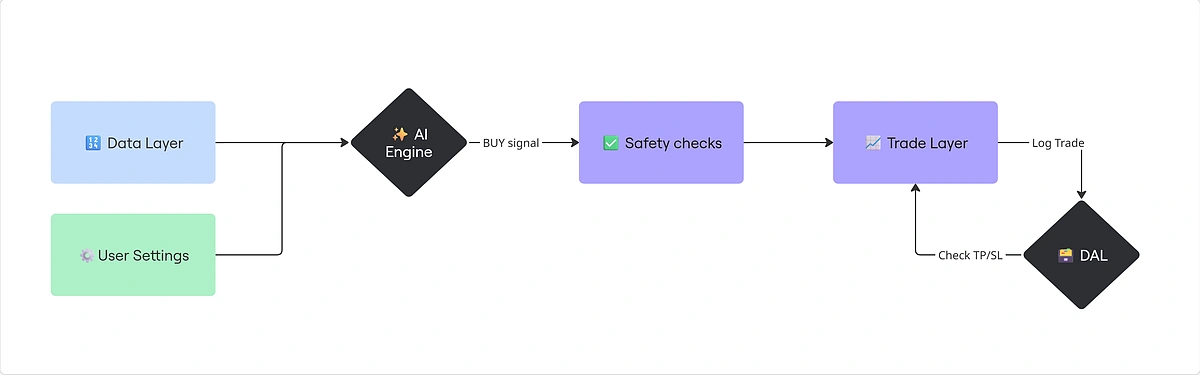
- Data Layer: This stage involves ingesting real-time and historical crypto data from sources like the CoinGecko API. This may include any time series data.
- User Settings: This includes the prompt and any specific trading instructions, such as Stop Loss and Take Profit.
- AI Engine: Data & prompts are ingested by the AI engine, which is typically powered by an LLM like OpenAI, to produce a recommendation.
- Safety Checks: Hard-coded rules like Stop Loss and Take Profit are applied, along with additional safeguards such as CoinGecko's honeypot checks to verify liquidity pool integrity and avoid scams.
- Trade Layer: The bot places trades based on the validated signal. For beginners, it is highly encouraged to start with paper trading to test strategies in a risk-free environment before deploying live funds on a CEX or DEX.
- Data Access Layer (DAL): Trades are stored locally for reporting purposes. The trade engine regularly checks if any order may be closed in accordance with the Take Profit or Stop Loss rules.
Prerequisites
Here’s what you’re going to need to complete this project:
- A CoinGecko API Key
- Python 3.11+
- An OpenAI API Key
Obtaining a CoinGecko API Key
All endpoints used in this guide can be accessed with a free Demo API key. If you don’t have one, follow this guide to get your free Demo API key.
AI trading bots may make frequent data requests, and can cause the Demo plan's rate limits to be exhausted quickly. For production use or intensive backtesting, upgrading to a paid plan is recommended.

For this project, we’ll be using the following CoinGecko API endpoints:
Obtaining an OpenAI API Key
To obtain an OpenAI API key, log in to your OpenAI account and navigate to API Keys under Organization.
Click +Create New Secret Key in the top right corner and copy the key.
Setting Up The Project Environment
To get started, create a new directory for your project:
Next, set up a Python virtual environment to isolate your project's dependencies:
Installing Dependencies
Install the required packages by creating a requirements.txt file in the project root with the following content:
Now install them by running:
Storing Credentials and Settings
Create a .env file in the project root to store API keys and trading configuration.
Copy this template:
Replace the placeholder API keys with your actual CoinGecko API key and OpenAI API key.
Here's what each setting does:
- TAKE_PROFIT: The percentage gain threshold to sell and lock in profits (e.g., 20% above entry price).
- STOP_LOSS: The percentage loss threshold to sell and cut losses (e.g., 10% below entry price).
- ORDER_AMOUNT: The fixed USD amount to allocate per trade.
- MIN_VOLUME_24H: Minimum trading volume (in USD) for a pool to qualify as safe.
- MIN_RESERVES_USD: Minimum liquidity reserves (in USD) to filter out low-liquidity pools.
- MIN_BUYS_24H: Minimum number of buys in the last 24 hours to indicate genuine activity.
- PROMPT_TEMPLATE: Path to the file containing the AI prompt template.
Create a prompt_template.txt file in your project root. We will store our system prompt in this separate file, which will be referenced in our .env file. We will define the prompt's content later in the guide.
To load your config, create a new file under /utils/load_env.py:
How to Feed Real-time & Historical Crypto Market Data to AI?
You can feed real-time and historical crypto market data to an AI trading from a comprehensive data source like the CoinGecko API. This data is crucial for the AI to perform its analysis. The CoinGecko API provides a wide range of data points, including real-time prices, historical OHLC (Open, High, Low, Close) candlestick data, market cap, and liquidity data, which are essential for building a robust trading strategy.
Fetching Data: How to Get Historical Data for Major Coins?
Under /services/services/coingecko_service.py, we’re going to define a CoinGecko class, with a method for each endpoint.
Start by importing the required dependencies and define the constructor to include the CoinGecko authentication headers. Don’t worry about any types that you have not yet defined.
Note: If you’re using the Demo API, you’ll need to change the self.root URL to https://api.coingecko.com/api/v3 and update the self.headers key to x-cg-demo-api-key.
Next, add a new method to the class to fetch OHLC data by coin ID:
To run this, instantiate the class and call the method with the desired parameters:
This will return raw candlestick data, along with a timestamp for search entry:
Continue by creating methods for the remaining CoinGecko endpoints, and nest them under the CoinGecko class.
The following methods will enable our AI crypto trading bot to fetch real-time prices, identify promising large caps, and find safe liquidity pools:
Defining Data
Under /data_access/models/, we’re going to define the three main object types that we’ll be working with: Coin, PaperOrder, and PortfolioItem
[...]/coin.py:
[...]/paper_order.py
[...]/portfolio_item.py
Building The AI Trading Workflow
To build an AI trading workflow, the AI engine will ingest market data, paired with a carefully crafted system prompt. This prompt is vital for optimizing the bot’s performance, and its outputs should always be rigorously tested.
How to Craft an AI Trade Analysis Prompt?
Start by drafting a clear, structured instruction that tells the LLM to evaluate supplied market data and deliver a formatted trade recommendation.
Prompt engineering is key here as it directly impacts how reliably the bot interprets data and makes decisions, turning a general-purpose LLM into a focused trading tool.
Here's a solid prompt template you can use or adapt. Save it in your prompt_template.txt for your bot to load:
How to Code an AI Trading Logic in Python?
Start by building a service that can interact with your favorite LLM, send user and system prompts, and return an output.
Create a new file under /services/openai_service.py. Define an OpenAI Class with a single method called get_chat_completion.
Our code now has the basic building blocks for fetching data from the CoinGecko API and passing it to OpenAI for technical analysis.
For this to be an actual trading bot, we need a service that can handle the buying and selling of cryptocurrencies.
Create a new file under /services/trading_service.py. Since our example illustrates AI trading in a safe, paper-trading environment, we won’t connect to an exchange API, and instead just return basic order information.
We have also added a calculate_cost_basis method to track the position's average entry price.
Storing Trade Data
The final missing component is a service that can store and retrieve our trading data. This will be our Data Access Layer (DAL).
For this project, we will use local .json files, as they require minimal setup and allow us to get started quickly.
Under /data_access/DAL/ we’re going to define 4 different files:
- Base_JSON_DAL.py: Base layer for reading and writing .json.
- coins_DAL.py: For operations on the coin object.
- orders_DAL.py: For operations on the paper_order object.
- portfolio_DAL.py: For operations on portfolio_item object.
[...]/base_JSON_DAL.py
[...]/coins_DAL.py
[...]/orders_DAL.py
[...]/portfolio_DAL.py
Building The Logic and Running The Trading Bot
This is where we put together all the services that we’ve built.
Create a main.py file at the root of your project. Inside, start by importing dependencies, defining file paths for our local .json storage, and instantiating the CoinGecko and OpenAI classes.
Next, let’s populate our local database with initial coin data.
Now let’s handle the buy logic:
On lines 4, 5, and 6, we feed the OHLC data into our AI engine to generate a trade recommendation. Based on our prompt, the AI will return a 'BUY', 'SELL', or 'NEUTRAL' signal. If the recommendation is not 'BUY', the function exits early.
Creating Stop Loss and Take Profit Algorithms
Next, let’s tackle the sell logic. A sell is triggered only when either the Stop Loss or Take Profit threshold is reached.
Finally, create an infinite loop so the bot continues to execute, look for new trade opportunities, and manage existing orders:
All that’s left to do now is tweak your settings and run your script.
How to Mitigate AI Crypto Trading Risks?
Risk in AI crypto trading is managed through hard-coded rules that can override the AI’s recommendations. While AI excels at data analysis, it lacks the human judgment to account for all market nuances, making manual safeguards essential.
Key mitigation techniques include setting firm stop-loss and take-profit levels, as we've done in our handle_sell method, and actively filtering out scam tokens. You can also avoid potentially malicious tokens by using data from CoinGecko API to check for honeypot flags or analyze metrics like liquidity and transaction volume.
How to Detect Scam Tokens Using CoinGecko API?
To detect scam tokens, you can use the CoinGecko API to analyze on-chain data and identify potential risks with the help of the Megafilter or Search Pools endpoints.
The surge in new tokens amplifies scam risks, especially honeypots that trap investors via manipulated liquidity, plus other frauds exploiting lax oversight.
For our implementation, we’re going to use the Search Pools endpoint as it allows us to pass a search query, filtering by coin symbol.
To add this check to your bot, simply modify the first 3 lines of your handle_buy function to include the new check. The AI will flag if no legitimate pools are found for your coin.
How to Backtest an AI Crypto Trading Strategy?
To backtest an AI trading bot across time-series data, the AI should generate a recommendation for each data point, using the full historical context each time. If the recommendation is to buy, log the price and timestamp accordingly. Start by fetching a long period of historical OHLCV data.
Consider leveraging CoinGecko’s paid API plans for access to comprehensive data stretching back to 2013, unlocking deeper insights for your strategy. From this, you can compute the average return of the AI’s recommendations to evaluate profitability.
Here is a fully working example of a backtest for the AI trading bot that we’ve built:
Can Beginners Use AI Crypto Trading Bots?
Yes, beginners can use AI crypto trading bots, especially with guides like this that break down the process into manageable steps using familiar tools like Python.
That said, while this tutorial lowers the entry barrier for building one, beginners should approach with caution, as crypto markets are volatile and unpredictable.
Always start with paper trading to simulate strategies without financial risk, and recognize that no bot guarantees profits.
The primary aim is to learn through experimentation in a safe setup before gaining enough confidence to transition to trading on live exchanges.
Do AI Bots Actually Work for Crypto Trading?
AI bots can enhance crypto trading by delivering data-driven insights and automation, though their success depends heavily on implementation and the quality of the underlying market data.
They offer clear advantages, such as pivoting strategies instantly with a new prompt and processing multiple data streams for complex analysis. However, challenges like potential AI 'hallucinations' and incorrect recommendations are inevitable, so it is crucial to approach AI trading with a mindset focused on learning and continuous validation.
Potential Future Enhancements
The current bot analyzes price and on-chain data, but you can extend its capabilities by incorporating social media or news feeds for sentiment analysis, giving the AI even more context when making trade recommendations.
Another powerful addition is a reasoning journal, where the bot logs the AI's rationale for each trade. This data can be invaluable for refining your prompts and improving strategy performance over time.
Conclusion
In this guide, you've gained practical skills to build an AI crypto trading bot: from setting up a clean project environment, to pulling in varied market and on-chain data via the CoinGecko API, crafting effective prompts for the AI's decision-making core, adding essential risk mitigations, and sketching out a backtesting framework to validate your setup.
Remember, AI bots serve to enhance your trading approach. They are tools for augmentation, not a substitute for thoughtful strategy and oversight.
Ready to go beyond testing? Consider upgrading to a paid API plan with access to higher rate limits and increased call credits that are necessary for running a production-level AI trading bot or conducting large-scale backtesting.








 Or check it out in the app stores


