





 Make us preferred on Google
Solana launchpads such as Pump.fun list new memecoins continuously, and price discovery can move quickly. For developers, that pace makes automated monitoring useful for running consistent, rules-based entry and exit logic.
A sniper bot is a tool designed to automatically buy newly launched tokens the moment liquidity becomes available on launchpads such as Pump.fun. By reacting instantly to on-chain events and market signals, such a bot aims to enter or exit positions more reliably than any human trader can. It is able to swiftly execute any kind of trading logic based on predetermined conditions.
In this article, we’ll walk through how to build a simple Pump.fun sniper bot using Python, leveraging the CoinGecko API, with its REST endpoints for token discovery and WebSocket streams for real-time monitoring.
Disclaimer: This guide is for educational purposes only and should not be considered financial advice. Always do your own research.
What is the Architecture of a Pump.fun Sniper Bot?
At its core, a Pump.fun sniper bot follows a simple three-pillar architecture – Scan, Filter, and Execute. Here’s how each pillar works:
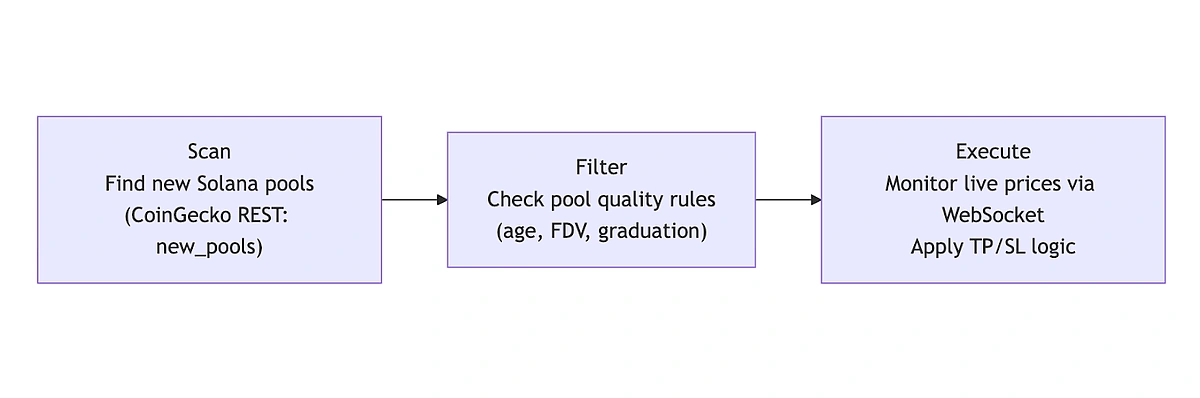 1. Scan (Discovery)
The Scan layer is responsible for finding opportunities. In practice, this means continuously querying a data source such as the CoinGecko API “New Pools” endpoint for newly created pools on a network and DEX. These pools represent tokens that have just launched or are about to receive liquidity, which is the exact moment sniper bots are designed to target.
2. Filter (Decision Logic)
The Filter layer takes market data from the previous scan step and applies decision logic to filter out pools that are not worth sniping, which may include low-quality or high-risk launches. Typical conditions analyzed here include:
-
Age: Is the pool recently created or has become stale (no activity)?
-
FDV (Fully Diluted Valuation): Is the valuation absurdly high relative to liquidity?
-
Graduation percentage: Has the bonding curve progress reached completion?
Pools meeting these predefined criteria are passed forward. This layer is the core of our strategy and risk control. These criteria are a starting point; additional checks and filters can be applied based on individual needs.
3. Execution (Trade Management)
Once a pool passes the filter, the Execution layer takes over. Here, the bot connects to a WebSocket stream to monitor real-time price movements. This allows it to:
-
Enter a position as soon as market conditions are met
-
React instantly to price movements
-
Trigger Take Profit or Stop Loss rules
Because meme coin price action can change in seconds, WebSockets are critical. Polling introduces latency because the server must query the data source for updates. This inherent delay makes data refresh slower compared to the continuous streaming of WebSockets. Therefore, polling is generally inadequate for the near-instantaneous decision-making required by a sniper bot.
Prerequisites
We will make use of a Jupyter notebook within VS Code as our primary development environment. Make sure to have installed the Jupyter extension.
Additionally, the following packages need to be installed or imported.
import pandas as pd

pd.set_option('display.max_columns', None)

import pytz

import duckdb

import time


import requests as rq

import json

from datetime import datetime


import os

from pathlib import Path


import asyncio

import json

import websockets

from urllib.parse import urlparse, parse_qs

import numpy as np

import psycopg
To start coding in a new notebook, simply create a new file with the .ipynb extension. To get a head start, you can clone this GitHub repository and open it in with VS Code.
CoinGecko API key
This guide uses the WebSocket API, which requires a Basic plan (from $29/mo only) or higher. To access the REST API endpoints, you will need at least a Demo API key. If you don't have one, read this guide on how to get your free Demo API key.
Setting Up the API Access
In order to have our environment set up for secure API access, we can save the keys locally to a .env file and read from there whenever needed. This file is excluded from the git repository by adding it to the exclusion list within the .gitignore file.
1
2
3
4
5
6
7
8
9
10
11
12
13
14
15
16
from dotenv import load_dotenv

# Loads variables from .env file into environment
load_dotenv()

CG_DEMO_API_KEY = os.getenv("CG_DEMO_API_KEY")
if not CG_DEMO_API_KEY:
    raise RuntimeError("Missing Demo API key in the environment")

CG_PRO_API_KEY = os.getenv("CG_PRO_API_KEY")
if not CG_PRO_API_KEY:
    raise RuntimeError("Missing Pro API key in the environment")

CG_BASIC_API_KEY = os.getenv("CG_BASIC_API_KEY")
if not CG_BASIC_API_KEY:
    raise RuntimeError("Missing Basic API key in the environment")
The .env file should have entries like this: CG_BASIC_API_KEY = “CG-XXXXX”
Request headers can be defined as shown below:
use_demo = {

          "accept": "application/json",

          "x-cg-demo-api-key" : CG_DEMO_API_KEY

}


use_pro = {

        "accept": "application/json",

        "x-cg-pro-api-key" : CG_PRO_API_KEY

}
Below function will handle the response from the REST API calls.
1
2
3
4
5
6
7
8
9
10
11
12
13
14
15
def get_response(endpoint, headers, params, URL):

    url = "".join((URL, endpoint))
    response = rq.get(url, headers=headers, params=params)

    try:
        data = response.json()
    except ValueError:
        print("Invalid JSON response")
        return None

    if response.status_code != 200:
        print(f"Failed to fetch data, status code {response.status_code}")

    return data
The base URLs for the Demo (free) API and the Pro API are assigned to the following variables:
PUB_URL = "https://api.coingecko.com/api/v3"

PRO_URL = "https://pro-api.coingecko.com/api/v3"
Setting up a PostgreSQL server
We will use a PostgreSQL database to store the price data streamed through the WebSocket. Follow the platform-specific instructions below to set it up:
Linux (Ubuntu/Debian)
sudo apt update

sudo apt install postgresql postgresql-contrib

sudo systemctl status postgresql

sudo -u postgres psql
In `psql`:
CREATE USER myuser WITH PASSWORD 'mypassword';

CREATE DATABASE mydb OWNER myuser;
macOS (Homebrew)
brew install postgresql@16

brew services start postgresql@16

psql -d postgres
In `psql`:
CREATE USER myuser WITH PASSWORD 'mypassword';

CREATE DATABASE mydb OWNER myuser;
Windows
- Download and install PostgreSQL from https://www.postgresql.org/download/windows/
- Use the Stack Builder/installer to set a password for the `postgres` user.
- Open SQL Shell (psql) and run:
CREATE USER myuser WITH PASSWORD 'mypassword';

CREATE DATABASE mydb OWNER myuser;
Connection string example:
postgresql://myuser:mypassword@localhost:5432/mydbStep 1: How to Find New Pump.fun Token Launches
In order to discover new token launches on Pump.fun, we will make use of the "New Pools" endpoint ( /onchain/networks/{network}/new_pools) for the Solana network.
The API response will be parsed based on the below logic. Note that it is important to store the token address (different from the pool address) for our WebSocket subscription later on.
1
2
3
4
5
6
7
8
9
10
11
12
13
14
15
16
17
18
19
20
21
22
23
24
25
26
27
28
29
30
31
32
33
34
35
36
37
38
39
def safe_get(d, path, default=None):
    """Safely get a nested dictionary value."""
    for key in path:
        if isinstance(d, dict) and key in d:
            d = d[key]
        else:
            return default
    return d

def collect_response(list_response):

    response_all = []

    for response in list_response.get("data", []):

        all_attributes = response.get("attributes", {})
        rel = response.get("relationships", {})

        base_token_add = safe_get(rel, ["base_token", "data", "id"], "NA")

        # If token_add exists, split it.
        token_add = base_token_add.split("_")[1] if base_token_add != "NA" and "_" in base_token_add else "NA"

        temp_dict = dict(
            pair = safe_get(all_attributes, ["name"], "NA"),
            pool_created_at = safe_get(all_attributes, ["pool_created_at"], "NA"),
            dex = safe_get(rel, ["dex", "data", "id"], "NA"),
            network = safe_get(rel, ["network", "data", "id"], "NA"),
            token_add = token_add,
            pool_add = safe_get(all_attributes, ["address"], "NA"),
            fdv_usd = safe_get(all_attributes, ["fdv_usd"], "NA"),
            market_cap_usd = safe_get(all_attributes, ["market_cap_usd"], "NA"),
            daily_volume = safe_get(all_attributes, ["volume_usd", "h24"], "NA"),
            daily_price_change = safe_get(all_attributes, ["price_change_percentage", "h24"], "NA"),
        )

        response_all.append(temp_dict)

    return response_all
The function below is useful for collecting data from multiple pages of an API endpoint, as it accepts an optional max_pages argument to retrieve a large selection of pools.
Parsed API response is converted to a pandas DataFrame. We also change timestamps to a local timezone (CET in this case) for better readability. Output is filtered on "dex" == "pump-fun" since that is the launchpad we are currently focusing on.
1
2
3
4
5
6
7
8
9
10
11
12
13
14
15
16
17
18
19
20
21
22
23
24
25
26
27
28
29
30
31
32
33
34
35
36
37
38
39
40
41
42
43
44
45
46
47
def get_new_pools(network, sort_by_col, max_pages=None):

    endpoint = f"/onchain/networks/{network}/new_pools"
    params = {}
    newpools_all = []
    page_count = 0

    # Follow pagination via the response links.next and collect across pages, with an optional max_pages cap.
    while True:
        pools_list_response = get_response(endpoint, use_pro, params, PRO_URL)

        # Prefer less setup? Equivalent call using CoinGecko's official Python SDK:
        # pip install coingecko-sdk
        #
        # from coingecko_sdk import Coingecko
        # client = Coingecko(pro_api_key=CG_PRO_API_KEY, environment="pro")
        #
        # response = client.onchain.networks.new_pools.get_network(network, page=page_count + 1)
        # pools_list_response = response.model_dump()

        if not pools_list_response:
            break

        newpools_all.extend(collect_response(pools_list_response))
        page_count += 1

        if max_pages is not None and page_count >= max_pages:
            break

        links = pools_list_response.get("links", {})
        next_link = links.get("next") if isinstance(links, dict) else None
        if not next_link:
            break

        parsed = urlparse(next_link)
        endpoint = parsed.path
        params = {k: v[0] for k, v in parse_qs(parsed.query).items()}

    df_new_pools = pd.DataFrame(newpools_all)

    # Change to local timezone
    df_new_pools["pool_created_at"] = pd.to_datetime(df_new_pools["pool_created_at"], utc=True)
    df_new_pools["pool_created_at"] = df_new_pools["pool_created_at"].dt.tz_convert("Europe/Berlin")

    return df_new_pools[df_new_pools["dex"] == "pump-fun"].sort_values(
        by=[f"{sort_by_col}"], ascending=False
    )
A sample of the top 5 pools sorted based on “pool_created_at” timestamps is shown below:

Step 2: How to Filter Profitable Pools to Snipe
Once we have a list of pool IDs, the bot needs to inspect them to determine the best "targets." We should avoid pools containing tokens with low liquidity, a low market cap, or an age greater than a certain threshold. Given a pool address, we can fetch its data using the /onchain/networks/{network}/pools/{pool_address} endpoint.
The pool API response can then be parsed based on the logic below:
1
2
3
4
5
6
7
8
9
10
11
12
13
14
15
16
17
18
19
20
21
22
23
24
25
26
27
28
29
30
31
32
33
34
def collect_pool_response(list_response):

    response = list_response.get("data", {})
    all_attributes = response.get("attributes", {})
    daily_tx = all_attributes["transactions"]["h24"]
    rel = response["relationships"]

    # Safely extract launchpad_details or default to empty dict
    launchpad_details = all_attributes.get("launchpad_details", {})

    response_dict = dict(
        pair = all_attributes["name"],
        dex = rel["dex"]["data"]["id"],
        token_add = rel["base_token"]["data"]["id"].split("_")[1],
        pool_add = all_attributes["address"],
        pool_created_at = all_attributes["pool_created_at"],
        fdv_usd = all_attributes["fdv_usd"],
        market_cap_usd = all_attributes["market_cap_usd"],
        daily_volume = all_attributes["volume_usd"]["h24"],
        daily_price_change = all_attributes["price_change_percentage"]["h24"],
        daily_buys = daily_tx["buys"],
        daily_sells = daily_tx["sells"],
        daily_buyers = daily_tx["buyers"],
        daily_sellers = daily_tx["sellers"],
        grad_pert = (
            launchpad_details.get("graduation_percentage")
            if launchpad_details else 0
        ),
        completed = launchpad_details.get("completed", False),
        completed_at = launchpad_details.get("completed_at", None),
        dest_pool = launchpad_details.get("migrated_destination_pool_address", None)
    )

    return response_dict
1
2
3
4
5
6
7
8
9
10
11
12
13
def get_pool_data(network, pool_address):

    target_url = f"/onchain/networks/{network}/pools/{pool_address}"

    pool_list_response = get_response(target_url,
                                      use_pro,
                                      "",
                                      PRO_URL)
    # SDK equivalent: client.onchain.networks.pools.get_address(pool_address, network=network)

    pool_all = collect_pool_response(pool_list_response)

    return pool_all
Once we have our list of pools, we can loop through them and gather details for each by calling the above endpoint. All this can be concatenated into a single pandas DataFrame.
1
2
3
4
5
6
7
8
9
10
11
12
13
14
15
16
17
18
19
20
21
22
23
24
25
26
27
28
29
30
31
32
33
34
def collect_pool_data(network, num_rows, max_pages):

    df_new_pools = get_new_pools(network, "pool_created_at", max_pages).head(num_rows)

    all_pool_data = []

    for pool_add in df_new_pools["pool_add"]:
        pool_data = get_pool_data(network, pool_add)
        all_pool_data.append(pool_data)

    df = pd.DataFrame(all_pool_data)

    df = df.astype({
        "pair": "string",
        "dex": "string",
        "pool_add": "string",
        "token_add": "string",
        "daily_buys": "Int64",
        "daily_sells": "Int64",
        "daily_buyers": "Int64",
        "daily_sellers": "Int64",
        "completed": "boolean",
        "dest_pool": "string",
    })

    # Numeric columns (coerce invalids to NaN)
    for col in ["fdv_usd", "market_cap_usd", "daily_volume", "daily_price_change", "grad_pert"]:
        df[col] = pd.to_numeric(df[col], errors="coerce")

    # Timestamps
    df["pool_created_at"] = pd.to_datetime(df["pool_created_at"], utc=True, errors="coerce")
    df["completed_at"] = pd.to_datetime(df["completed_at"], utc=True, errors="coerce")

    return df
Our filtering logic below looks for tokens which are not older than 10 minutes, have an FDV greater than 2,500 USD, and have a graduation percentage less than 75%.
1
2
3
4
5
6
7
8
9
10
11
12
13
14
15
16
17
18
def analyze_pools(network, num_rows, max_pages=5):

    df_pool_data = collect_pool_data(network, num_rows, max_pages)

    # Inspect key metrics such as Fully Diluted Volume (FDV) and age of the pool. We want
    # to filter out pools which are older than 10 minutes and have FDV less than $5000.
    cutoff = pd.Timestamp.now(tz="UTC") - pd.Timedelta(minutes=10)

    df_filtered = df_pool_data[
                        (df_pool_data["pool_created_at"] >= cutoff) &
                        (df_pool_data["fdv_usd"] > 2500) &
                        (df_pool_data["grad_pert"] < 75)
                        ].copy()

    # Convert to local timezone
    df_filtered["pool_created_at"] = df_filtered["pool_created_at"].dt.tz_convert("Europe/Berlin")

    return df_filtered.sort_values(by = "grad_pert", ascending = False)

Step 3: How to Monitor Real-Time Prices via WebSocket for Trade Entries & Exits
After identifying target tokens/pools in the previous section, we will monitor their real-time price activity by connecting to CoinGecko’s WebSocket API.
WebSockets maintain a persistent two-way connection, allowing the server to push real-time updates without repeated polling. This continuous data stream will run within our notebook and should be written to a database, such as PostgreSQL, which supports concurrent reads while being continuously updated. Accessing this data from a separate notebook will enable us to define and run our trading simulation logic.
First, we will store our list of target pools in a DuckDB database for access across multiple Jupyter notebooks.
1
2
3
4
5
6
7
8
9
10
11
12
13
14
15
16
17
18
19
20
21
df_pools = analyze_pools("solana", num_rows=200).head(50)
token_list = df_pools["token_add"].dropna().unique().tolist()

DB_PATH_1 = str(Path.cwd() / "token_list.duckdb")
dbw_1 = duckdb.connect(DB_PATH_1)

dbw_1.execute("DROP TABLE IF EXISTS token_list")

dbw_1.execute("""
CREATE TABLE IF NOT EXISTS token_list (
    token_address TEXT PRIMARY KEY
);
""")

# Insert tokens (ignore duplicates)
dbw_1.executemany(
    "INSERT OR IGNORE INTO token_list(token_address) VALUES (?)",
    [(t,) for t in token_list]
)

dbw_1.close()
The Basic API key needs to be passed on within the WebSocket URL:
WS_URL = f"wss://stream.coingecko.com/v1?x_cg_pro_api_key={CG_BASIC_API_KEY}"

NETWORK_ID = "solana"
We will now set up the connection to our PostgreSQL server and create a new table price_stream with the expected schema:
1
2
3
4
5
6
7
8
9
10
11
12
13
14
15
16
17
18
PG_DSN = "postgresql://vnegi:1qaz2wsx@localhost:5432/price_ws_stream"

conn = psycopg.connect(PG_DSN)
conn.autocommit = True
cur = conn.cursor()

cur.execute("""
CREATE TABLE IF NOT EXISTS price_stream (
    channel_type TEXT,
    network_id TEXT,
    token_address TEXT,
    usd_price DOUBLE PRECISION,
    usd_price_24h_change_percentage DOUBLE PRECISION,
    usd_market_cap DOUBLE PRECISION,
    usd_24h_vol DOUBLE PRECISION,
    last_updated_at TIMESTAMPTZ
);
""")
Since we have a token_list with multiple tokens, we will need to set up our WebSocket connection to receive data streams for all of them. This is not an issue since a maximum of 100 concurrent subscriptions are allowed per channel per socket.
Below function stream_token_prices_and_write_to_pg opens a new connection, subscribes to the OnchainSimpleTokenPrice channel for a list of token addresses, and then continuously reads messages. It then parses each incoming message and unwraps nested data when needed. Additionally, we also log subscription confirmation messages (code == 2000). For price updates (c == "G1"), we map the short keys using rename_map, convert the UNIX timestamp to a CET/CEST datetime, and insert the rows into the price_stream table which we created earlier.
1
2
3
4
5
6
7
8
9
10
11
12
13
14
15
16
17
18
19
20
21
22
23
24
25
26
27
28
29
30
31
32
33
34
35
36
37
38
39
40
41
42
43
44
45
46
47
48
49
50
51
52
53
54
55
56
57
58
59
60
61
62
63
64
65
66
67
68
69
70
71
72
73
74
rename_map = {
    "c": "channel_type",
    "n": "network_id",
    "ta": "token_address",
    "p": "usd_price",
    "pp": "usd_price_24h_change_percentage",
    "m": "usd_market_cap",
    "v": "usd_24h_vol",
    "t": "last_updated_at",
}

async def stream_token_prices_and_write_to_pg(token_addresses):
    async with websockets.connect(WS_URL) as ws:
        # subscribe
        await ws.send(json.dumps({
            "command": "subscribe",
            "identifier": json.dumps({"channel": "OnchainSimpleTokenPrice"})
        }))

        # set tokens
        await ws.send(json.dumps({
            "command": "message",
            "identifier": json.dumps({"channel": "OnchainSimpleTokenPrice"}),
            "data": json.dumps({
                "network_id:token_addresses": [f"{NETWORK_ID}:{t}" for t in token_addresses],
                "action": "set_tokens"
            })
        }))

        while True:
            msg = await ws.recv()
            payload = json.loads(msg)

            # Debugging: print the raw payload
            # print(payload)

            if isinstance(payload, dict) and isinstance(payload.get("message"), dict):
                data = payload["message"]
            else:
                data = payload

            # Check if we get subscription confirmation
            if isinstance(data, dict) and data.get("code") == 2000:
                print(data.get("message"))

            # price data
            if isinstance(data, dict) and data.get("c") == "G1":
                row = {rename_map[k]: data.get(k) for k in rename_map}

                row["last_updated_at"] = (
                    pd.to_datetime(row["last_updated_at"], unit="s", utc=True)
                    .tz_convert("Europe/Berlin")
                )

                #print(row)

                cur.execute(
                    """
                    INSERT INTO price_stream
                    (channel_type, network_id, token_address, usd_price,
                     usd_price_24h_change_percentage, usd_market_cap, usd_24h_vol, last_updated_at)
                    VALUES (%s, %s, %s, %s, %s, %s, %s, %s)
                    """,
                    (
                        row["channel_type"],
                        row["network_id"],
                        row["token_address"],
                        row["usd_price"],
                        row["usd_price_24h_change_percentage"],
                        row["usd_market_cap"],
                        row["usd_24h_vol"],
                        row["last_updated_at"],
                    ),
                )
The above function can be executed as: await stream_token_prices_and_write_to_pg(token_list)
It runs continuously and populates our database with the incoming stream of data for all the tokens. We can now switch to another notebook in order to build and execute our trading logic.
To fetch the list of tokens saved earlier to a local DuckDB database, use the following code snippet:
1
2
3
4
5
6
7
DB_PATH_1 = str(Path.cwd() / "token_list.duckdb")
dbw_1 = duckdb.connect(DB_PATH_1)

tokens = dbw_1.execute("SELECT token_address FROM token_list").fetchall()
token_list = [t[0] for t in tokens]

dbw_1.close()
To verify if our PostgreSQL database actually has any data, we can run the following query:
1
2
3
4
5
6
7
8
9
10
11
12
13
14
PG_DSN = "postgresql://vnegi:1qaz2wsx@localhost:5432/price_ws_stream"

conn_r = psycopg.connect(PG_DSN)

# Set the session timezone for the connection
conn_r.execute("SET TIME ZONE 'Europe/Berlin'")

df = pd.read_sql("""
    SELECT DISTINCT ON (token_address) *
    FROM price_stream
    ORDER BY token_address, last_updated_at DESC
""", conn_r)

df

Our trading logic will act on the data read from our PostgreSQL database. It needs to have the following conditions built-in:
-
Entry price: Price at detection
-
Take Profit: Sell if Price > Entry + 50%
-
Stop Loss: Sell if Price < Entry - 20%
We start with an empty state (defined as “None”), run the simulation logic every 2 seconds and then save the state for every token. A log line is printed only when the state changes. Additionally, the line color is configured for easy visibility of profit (green) and loss (red) trades.
1
2
3
4
5
6
7
8
9
10
11
12
13
14
15
16
17
18
19
20
21
22
23
24
25
26
27
28
29
30
31
32
33
34
35
36
37
38
39
40
41
42
43
44
45
46
47
48
49
50
51
52
53
54
55
56
57
58
59
60
61
62
63
64
65
66
67
68
def trade_status(usd_price, entry):

    if usd_price > entry * 1.5:
        return "take_profit"
    if usd_price < entry * 0.8:
        return "stop_loss"

    return "monitoring"

# Per-token state
state = {t: {"last_ts": None, "entry_price": None, "last_status": None} for t in token_list}

# Use ANSI escape codes in the print strings for colors
COLORS = {
    "monitoring": "\033[34m",  # blue
    "stop_loss": "\033[31m",   # red
    "take_profit": "\033[32m", # green
}
RESET = "\033[0m"

while True:
    time.sleep(2)

    for token in token_list:
        last_ts = state[token]["last_ts"]
        entry_price = state[token]["entry_price"]
        last_status = state[token]["last_status"]

        if last_ts is None:
            df = pd.read_sql(f"""
                                SELECT *,
                                    last_updated_at AT TIME ZONE 'Europe/Berlin' AS last_updated_at_cet
                                FROM price_stream
                                WHERE token_address = '{token}'
                                ORDER BY last_updated_at ASC
                            """, conn_r)
        else:
            df = pd.read_sql(f"""
                                SELECT *,
                                    last_updated_at AT TIME ZONE 'Europe/Berlin' AS last_updated_at_cet
                                FROM price_stream
                                WHERE token_address = '{token}'
                                  AND last_updated_at > '{last_ts}'
                                ORDER BY last_updated_at ASC
                            """, conn_r)

        if df.empty:
            continue

        if entry_price is None:
            entry_price = df.iloc[0]["usd_price"]

        for _, row in df.iterrows():
            status = trade_status(row["usd_price"], entry_price)

            ts = row["last_updated_at_cet"].strftime("%Y-%m-%d %H:%M:%S")
            price_fmt = f"{row['usd_price']:.8f}"
            entry_fmt = f"{entry_price:.8f}"
            pct = ((row["usd_price"] / entry_price) - 1) * 100

            if status != last_status:
                line = f"{ts} | {token[:12]}... | {status:<11} | price={price_fmt} | entry={entry_fmt} | chg={pct:>7.2f}%"
                print(f"{COLORS.get(status, '')}{line}{RESET}")
                last_status = status

            last_ts = row["last_updated_at"]

        state[token].update({"last_ts": last_ts, "entry_price": entry_price, "last_status": last_status})
The following is an example of the sniper bot's operational logs and results:

Further Enhancements
Once our logic is profitable in simulation, we can consider these enhancements for production.
At this stage, we are hardening it for real-world conditions where latency, volatility, and execution risk matter.
Wallet Integration
To move beyond paper trading, the bot needs direct wallet and transaction support on Solana.
In Python, this is typically done using libraries such as solana.py or Solders, which allow us to:
-
Load and manage a Solana wallet
-
Sign and submit transactions
-
Interact with on-chain programs and DEXes
Alternatively, we can integrate directly with a Solana DEX trading API, letting the bot submit swaps without manually crafting instructions.
Slippage Protection (Surviving Meme Coin Volatility)
Meme coins are extremely volatile, so price can move several percent between transaction creation and confirmation. To protect against bad entries or failed transactions, adding slippage tolerance logic is recommended and is outlined below:
-
Estimate price impact before submitting a trade
-
Only execute buys if expected slippage < 5 %
-
Abort trades if liquidity suddenly drops or spreads widen
This can prevent scenarios where the bot technically “wins the race” but enters at a terrible price due to sudden demand spikes.
Universal Launchpad Integration (Beyond Pump.fun)
One of the biggest advantages of this architecture is that it’s plug-and-play. Our bot isn’t hardcoded to a single launchpad.
That means the same architecture can be adapted to other launchpads by changing network and launchpad filters, for example Raydium on Solana and non-Solana launchpads such as Four.meme.
Altogether, these enhancements turn a prototype sniper bot into a production-ready system. It connects to a real wallet, protected against volatility, and flexible enough to operate across multiple launchpads thanks to the wide coverage of onchain market data powered by GeckoTerminal.

Conclusion
In this guide, we walked through how to build a Pump.fun sniper bot that can discover, qualify, and track newly launched tokens using the CoinGecko API. From scanning new Solana pools to filtering out obvious risks and monitoring price action in real time using WebSockets, you now have a clear blueprint for building an event-driven Pump.fun sniper bot in Python.
One of the biggest advantages of this approach is speed with simplicity. By relying on high-quality, indexed market data, we avoid the operational overhead of running and maintaining a full Solana node, while still getting fast, reliable signals suitable for launchpad trading on platforms like Pump.fun.
If you plan to take this further, or make this production-ready, consider upgrading to a paid API plan. This grants you access to the WebSocket API, exclusive endpoints, higher rate limits, and more call credits, all of which are essential for this strategy. These enhanced features make a meaningful difference, allowing you to concurrently monitor and snipe more tokens simultaneously.
Disclaimer: This guide is for educational and informational purposes only and does not constitute financial advice. Meme coin trading is highly speculative and carries significant risk. Always do your own research and experiment responsibly.









 Or check it out in the app stores


