



 Make us preferred on Google
Brighty Overview

Brighty is focused on bridging traditional finance and the crypto economy. The app offers a seamless multi-currency experience with both banking features and crypto management, along with high-yield earning products and AI-driven wealth management. To date, Brighty has over 250,000 registered customers across 50+ countries and is fully licensed in the EU.
What Is Brighty App?
Brighty seamlessly bridges two worlds that have traditionally been separate: conventional banking and cryptocurrency. Unlike traditional crypto wallets that focus solely on digital assets, or banking apps that don’t include crypto, Brighty supports multiple fiat currencies alongside popular cryptocurrencies and stablecoins, allowing you to manage everything from a single app.
Brighty is designed to offer a "brighter approach to money" by simplifying transactions and maximizing growth potential across both fiat currencies and cryptocurrencies. This unified approach means you can receive your salary via IBAN into a EUR account, convert some to USDC, and start earning interest — all without leaving the app or juggling multiple platforms.
The platform provides a secure and regulated environment, being licensed in the EU and using industry-leading security measures like Fireblocks for audited custody. Your fiat funds are safeguarded in segregated accounts and protected under EU financial regulations. For crypto assets, the platform itself acts as the regulated custodian, with full responsibility for asset safeguarding. It uses industry-leading technology such as Fireblocks to ensure secure storage and operational integrity, but custody remains entirely within the platform.
Installing and Setting Up Brighty App
Brighty is available for both iOS and Android devices, making it accessible to most smartphone users.
Step 1: Download the App
Visit the official Brighty website at https://brighty.app/en and select your platform (iOS or Android). Download the app from the Apple App Store or Google Play Store, then install it on your mobile device.
Important: Always verify the authenticity of your source when downloading any financial applications. Only download from official app stores or the official Brighty website.
Step 2: Create Your Account
Open the Brighty app and tap on the sign-up option. You'll need to enter your phone number (selecting your country code first), then tap "Send code" to receive a verification code via SMS.
Enter the 6-digit verification code you received. If you don't receive the code, you can request a new one after 30 seconds.

Step 3: Set Up Security
Create a 4-digit passcode for quick access to your app, then confirm it by entering it again.
You'll be prompted to turn on biometric login using fingerprint or face recognition. You can choose "Turn on biometric login" for enhanced security or select "Later" to set it up afterward. Biometric login provides a good balance between convenience and security, letting you access your account quickly while keeping it protected.

Step 4: Complete KYC Verification
After setting up your account, you'll need to complete Know Your Customer (KYC) verification for compliance. This process is standard for regulated financial platforms and helps protect both you and the platform from fraud. You'll need to provide personal information including government-issued ID documents, proof of address documents issued in the last six months, and source of funds information.
Once your account is verified, Brighty allows you to open and manage multiple types of accounts for different currencies and assets. Here are some key features available on Brighty:
Currency Accounts: Crypto and Fiat
Brighty supports a comprehensive range of currencies across both traditional and digital finance. You can open fiat accounts in EUR, USD, GBP, and other major currencies, each coming with its own named IBAN for receiving bank transfers via SEPA, FedWire, or Faster Payments. This means you can even use Brighty as your primary bank account, receiving salary payments and making international transfers just like any traditional bank.
On the crypto side, you'll find support for popular cryptocurrencies like BTC and ETH, alongside stablecoins such as USDC and EURC. The stablecoins are particularly useful as they combine the stability of fiat currencies with the earning potential of DeFi, making them ideal candidates for the platform's high-yield earning features.
How to Open a Currency Account
From the home screen, navigate to "Add new product," then select "Currency account." Choose the currency you want (GBP, EUR, ETH, BTC, etc.) and follow the prompts to open your account.
You can top up currency apps using funds within your other Brighty accounts or vaults, or opt for external transfers.
Each fiat currency account comes with its own named IBAN, allowing you to receive funds via SEPA, FedWire, or Faster Payments, make international transfers, and set up direct deposits. This effectively turns Brighty into a full-featured bank account for that currency.
For crypto accounts, you can opt to fund them through purchasing crypto online through Google Pay, credit/debit cards, PayPal, or transfer crypto from another wallet.

Physical and Virtual Cards
Brighty bridges the gap between holding crypto and spending it in everyday life through both physical and virtual payment cards. These Visa debit cards (plus a virtual Mastercard option) draw directly from your Brighty accounts, whether fiat or crypto, letting you spend your assets easily without requiring manual conversions. The cards support contactless payments and integrate seamlessly with Apple Pay and Google Pay.
What makes these cards special is that your card balance contributes to the Rewards program, letting you earn USDC with your idle assets. Through the app, you can view your complete transaction history, set spending limits to control your budget, freeze or unfreeze cards if you misplace them or suspect fraudulent activity, order replacement cards if needed, and view card limits and fees.
How to Get a Physical Card
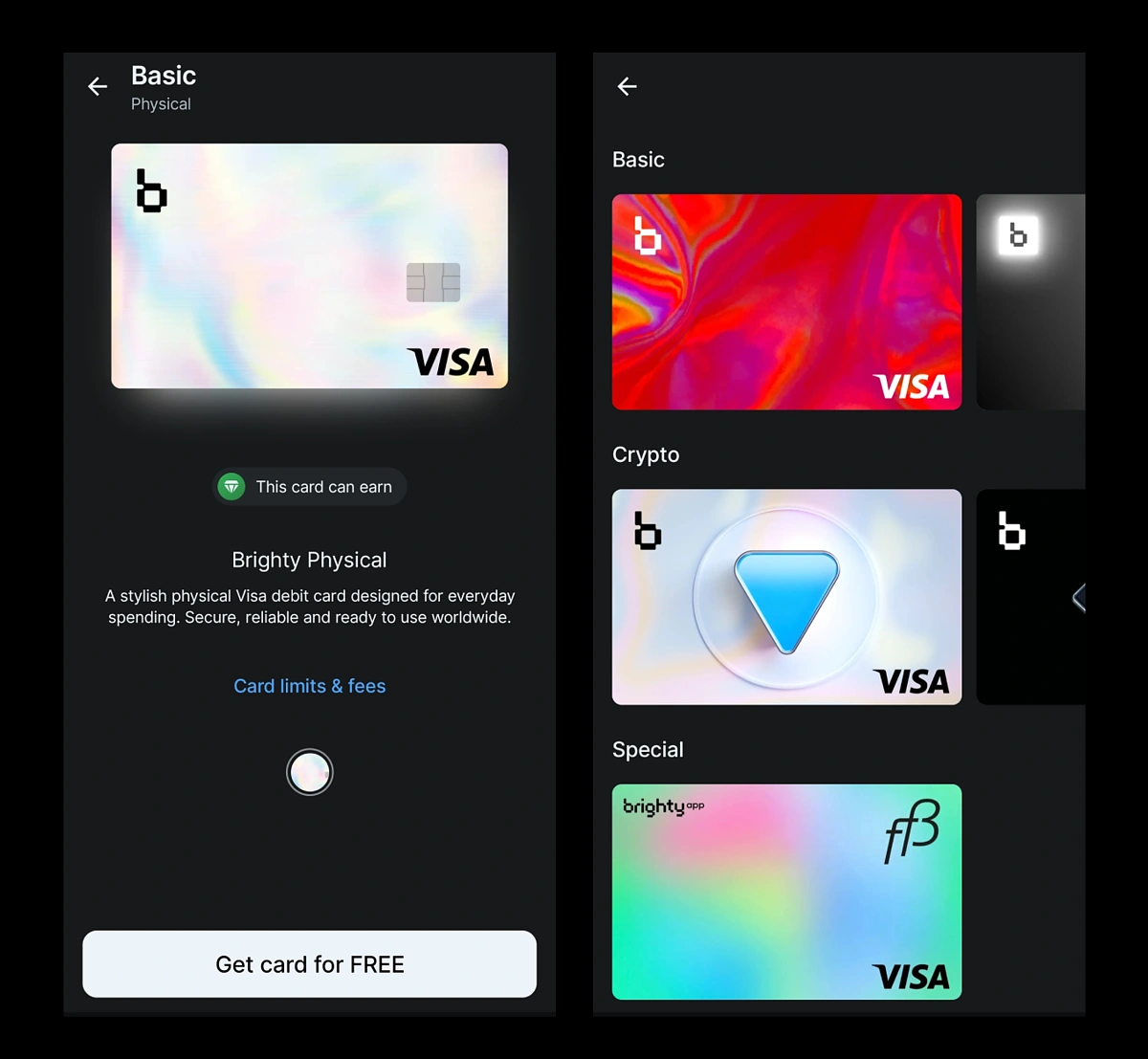
Navigate to "Add new product" and select "Physical card." Review the card information and benefits, then tap "Get card for FREE" to order your card. The Brighty Physical card is a stylish Visa debit card designed for everyday spending that can earn rewards. It typically arrives within a few business days, depending on your location.
How to Get a Virtual Card
For immediate use, navigate to "Add new product" and select "Virtual card." Complete the setup process, and your virtual card will be instantly available for online purchases. Virtual cards provide an extra layer of security for online shopping and can be easily frozen or deleted if compromised, without affecting your other accounts.
To view detailed information about card limits and fees, tap on "Card limits & fees" when viewing your card details. This transparency helps you make informed decisions about your card usage.
Brighty Rewards
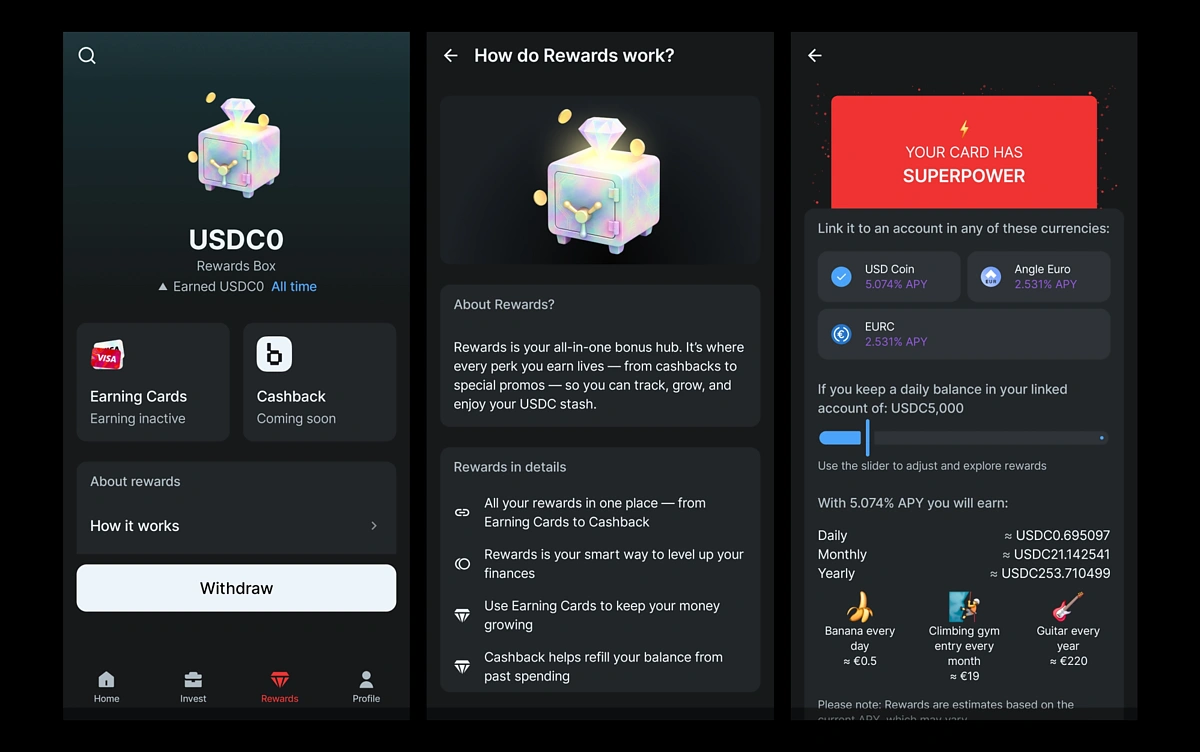
You can deposit funds into your USDC account to earn up to 5% APY on the balance linked to your payment card through the Rewards Box.
Once you've accumulated rewards, you can withdraw them to your USDC wallet by tapping the "Withdraw" button. These rewards stack on top of any Earning Vault yields you're generating.
Earning Vaults
This is where Brighty truly differentiates itself from traditional banking. Earning Vaults provide a straightforward way to earn yield on your crypto holdings, with rates reaching up to 10% APY on stablecoins like USDC — far exceeding anything traditional savings accounts offer.
Brighty offers flexibility: no lock-up periods, free deposits and withdrawals, and daily compound interest that starts accruing immediately.
How to Open an Earning Vault
Navigate to "Add new product" and select "Earning vault." Choose which cryptocurrency you want to earn with from the available options. You can select from Cardano, Ether, Tezos, Angle Euro, EURC, or USD Coin, with APY rates ranging from 1.5% to 10%*.
*Note that the financial terms and percentages are subject to change.
Review the rate for your chosen asset and confirm to open your earning vault. Once opened, you can transfer funds from your regular wallet to start earning immediately. These vaults have specific minimum amounts that need to be allocated in order to open a Vault — at least EUR 100 or the equivalent in a different currency.

Brighty Invest AI
For those seeking more aggressive growth, Brighty Invest AI takes a different approach entirely. Rather than fixed-rate earning, an AI agent actively manages your portfolio across various market sectors, targeting annual returns of up to 30%. The AI analyzes market trends, historical performance data, and sector movements to automatically rebalance your holdings.
Current investment strategies include sector-focused portfolios like S&P 500 Information Technology (which returned 25% last year) and Energy (19% last year). These returns aren't guaranteed and come with correspondingly higher risk, but for investors with longer time horizons and tolerance for volatility, they offer potential for significant growth.
How to Use Brighty Invest AI
Navigate to "Add new product" and select "Brighty Invest AI." Review the AI-driven investment strategy details and complete the setup to start using automated portfolio management. To use this feature, set up your Brighty Invest AI account, deposit funds, select your preferred strategy (or let the AI choose based on current market conditions), and monitor performance through the app.
You can withdraw or rebalance as needed, though unlike the Earning Vaults, market-based investments may fluctuate in value.

Instant Transfers and Exchange
Moving money between Brighty users happens instantly with zero transaction fees, whether you're sending EUR, USDC, or BTC. This makes splitting bills with friends or sending money to family members seamless, especially if they're also using Brighty. For external transfers, the platform supports standard banking rails like SEPA and SWIFT for fiat, alongside blockchain transfers for crypto.
The built-in exchange feature lets you convert between any supported currencies at competitive rates, making it easy to rebalance your portfolio or move funds from fiat to crypto and back as needed.
How to Deposit and Transfer Funds
Brighty makes it easy to move money between your accounts, other Brighty users, and external wallets or bank accounts.
Depositing Fiat Currency
From the home screen, select the fiat account you want to deposit into (EUR, USD, or GBP). Tap on your IBAN details to view your account information, which you can share with anyone who needs to send you money, or use to set up direct deposits from employers or other sources.
Funds will appear in your account once the transfer is processed. Thanks to Open Banking integration, many deposits are instant, while traditional SEPA transfers typically arrive the same day. This makes Brighty practical for receiving regular income, not just occasional transfers.
Depositing Cryptocurrency
Select the cryptocurrency wallet you want to deposit into, then tap "Receive" or the QR code icon. You can either copy your wallet address or show the QR code to the sender. Wait for the blockchain transaction to confirm — timing varies depending on network congestion and the specific blockchain.
Important: Always double-check the wallet address and ensure you're using the correct blockchain network. Sending funds to the wrong address or network can result in permanent loss. When in doubt, send a small test amount first.
Sending Money to Other Brighty Users
From the home screen, tap the "Send" button and select the account or wallet you want to send from. Enter the recipient's Brighty username, email, or phone number, specify the amount, then review the details and confirm.
Transfers between Brighty users are instant and have no transaction fees, making it perfect for splitting bills, sending gifts, or reimbursing friends.
Sending Money to External Accounts
For Fiat Transfers: Tap "Send" from your fiat account and select "External transfer." Enter the recipient's bank details (IBAN, SWIFT, etc.), specify the amount and add any required reference information, then review and confirm the transfer.
Standard bank transfer fees and processing times apply.
For Crypto Transfers: Open the cryptocurrency wallet you want to send from and tap "Send." Enter or scan the recipient's wallet address, specify the amount, then review the network fee and confirm.
Network fees vary based on blockchain congestion and can sometimes be significant, so check the fee before confirming.
Using the Exchange Feature
Brighty allows you to instantly convert between different currencies and cryptocurrencies. From the home screen, tap the "Exchange" button, select what you want to exchange from and to, enter the amount, then review the exchange rate and any fees before confirming.
This feature is particularly useful for rebalancing your portfolio or moving funds between earning opportunities without needing external exchanges.
Final Thoughts
Brighty App provides a unified solution for modern finance, combining the safety and familiarity of traditional banking with the high-growth potential of the crypto economy. By offering a secure, regulated, and feature-rich platform, it simplifies the complex world of crypto, making it accessible for everyday spending and long-term wealth building.
Brighty is ideal for users who want to manage both fiat and crypto in one place without juggling multiple apps. If you're ready to start using Brighty, you can download the app from https://brighty.app/en and complete the signup and verification process.
If you encounter issues or have questions, check the in-app help center for immediate answers to common questions. You can also visit the Brighty website for comprehensive FAQs and documentation.
This guide is for educational purposes and should not be considered financial advice. Cryptocurrency investments carry risk — past performance doesn't guarantee future results. APY rates are subject to change based on market conditions and protocol performance. Always do your own research before making investment decisions.









 Or check it out in the app stores


