





 Make us preferred on Google
Key Takeaways
-
CoinGecko’s Categories group crypto assets by shared narratives, use cases, or technologies.
-
Grouping this way clarifies sector fundamentals and streamlines analysis.
-
Every category and sub-category features its own Key Stats tab, including data charts and performance metrics that deliver actionable, sector-level insights.
-
Categories make discovery easy for newcomers and enable deeper due-diligence for seasoned analysts.
-
In this article, we review the Category feature and guide readers on how to use it for narrative analysis.
Over 17,000 crypto assets are tracked on CoinGecko. Each asset bears a unique identity, albeit with remarkable similarities between several assets. The Categories feature helps users make sense of it all by grouping related projects into clear, thematic clusters. Whether it's Real World Assets (RWA) or Artificial Intelligence (AI), Categories make it easier to explore specific narratives, compare similar projects, and analyze market trends.
While Categories have long been part of the platform, the feature has evolved beyond basic groupings to offer deeper insights. A recent update introduced Key Stats, now available on the CoinGecko platform, further enhancing category-level research.
This guide walks through how you can use Categories to sharpen your crypto research and investment process.
Watch this tutorial to get started:
What Are Categories on CoinGecko?
Categories group crypto assets that share common attributes. These may include:
-
Use cases – e.g., Stablecoins, Payments, Prediction Markets
-
Underlying technologies – e.g., Zero-Knowledge, Layer 2
-
Narratives – e.g., Real World Assets (RWA), Artificial Intelligence (AI), Memecoins
This helps users:
-
Explore by sector: Discover tokens tied to themes like AI, RWA, DeFi, and more.
-
Track trends early: Monitor narratives gaining traction and explore the tokens driving the trend.
-
Compare sector performance: View real-time market data grouped by theme or function.
-
Find relevant tokens quickly: For example, searching "Artificial Intelligence" shows all AI-related tokens in one place.
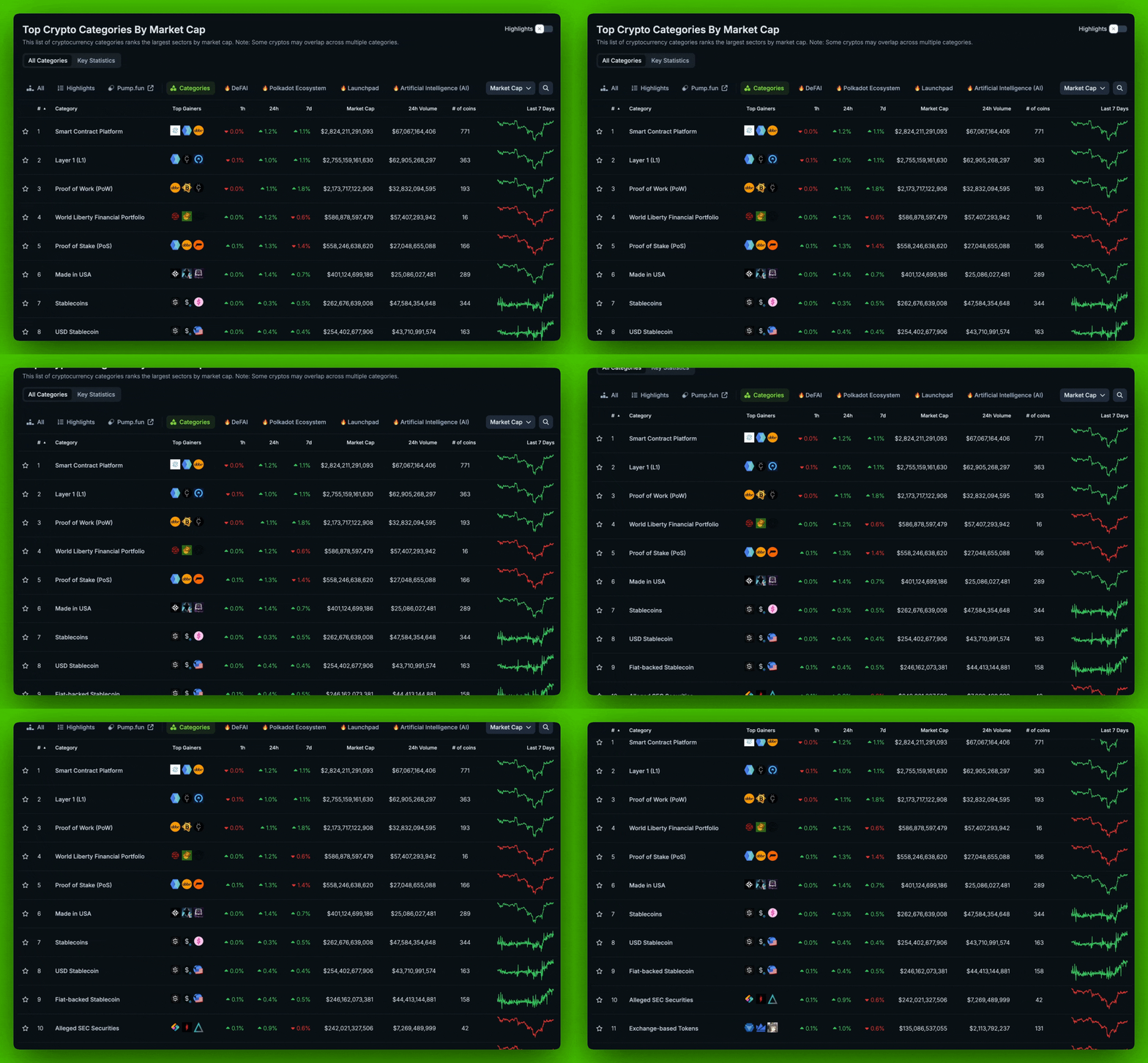
What You’ll See on a Category Page
Every category page provides a snapshot of the projects and market conditions within that segment.
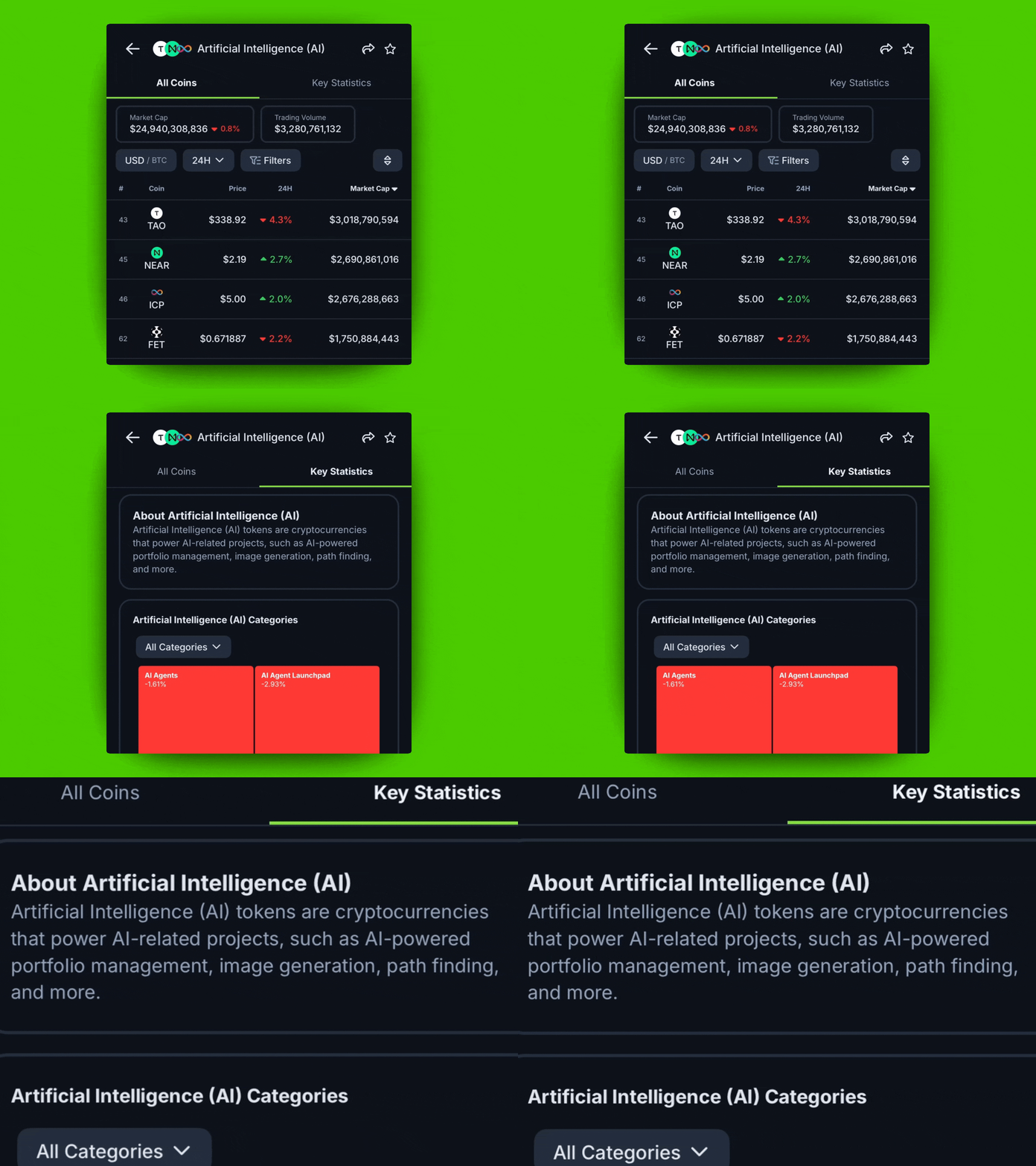
Category Description: Summarizes what the category includes and what makes the assets within it similar.
-
On the CoinGecko App: Go to the Key Statistics section to view the category description.
-
On Desktop: Click “Read More about [Category Name]” at the top of the page.
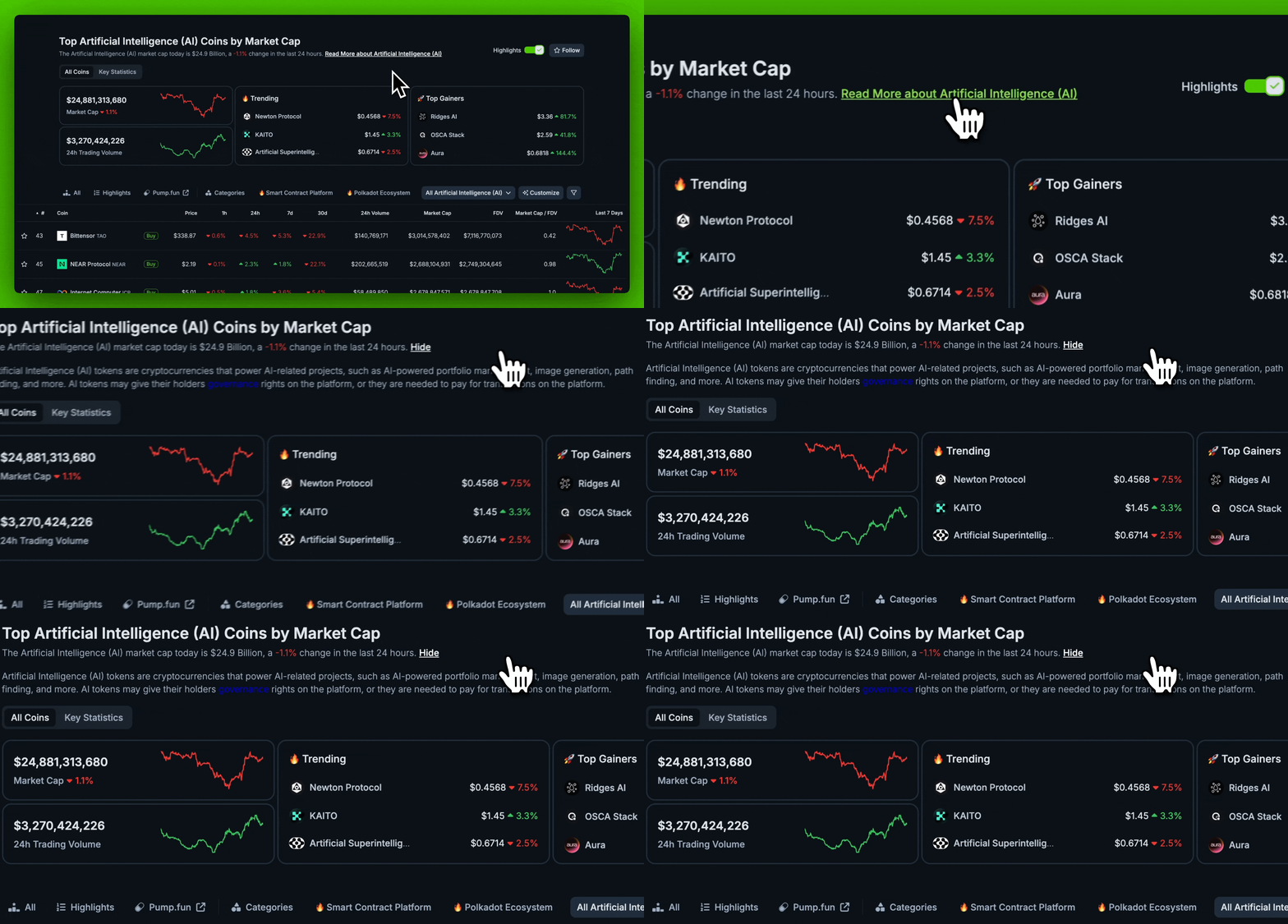
Category Highlights (Desktop only): Displays key metrics like 24-hour trading volume, market cap, top gainers, and trending tokens within the category.
These insights are especially useful for identifying strong performers or rising narratives within specific themes.

How to Access the Categories Feature on CoinGecko
You can explore categories in the following ways:
-
On App: Tap “Categories” in the bottom menu.
-
On Desktop: Click on the “Categories” tab in the top navigation bar.
-
Alternative: Use the search bar to type a category name (e.g., “Gaming”), then filter results by category.
Customize Your Search with Filters
CoinGecko’s Categories feature also includes custom filters that help you zoom in on the exact type of tokens you’re looking for within a category. This makes it easier to discover projects that match your interests, strategies, or research goals.
You can filter tokens based on:
-
Market Cap (e.g., small-cap, mid-cap, large-cap)
-
24-Hour Trading Volume
-
24-Hour Price Change
These filters are especially helpful when you want to find specific token types within a broader category.
For example: You want to find Solana-based memecoins that are up more than 15% in the last 24 hours.
-
Go to the “Meme” category, apply filters:
-
Chains: Solana
-
24h Price Changes: Greater than 15%
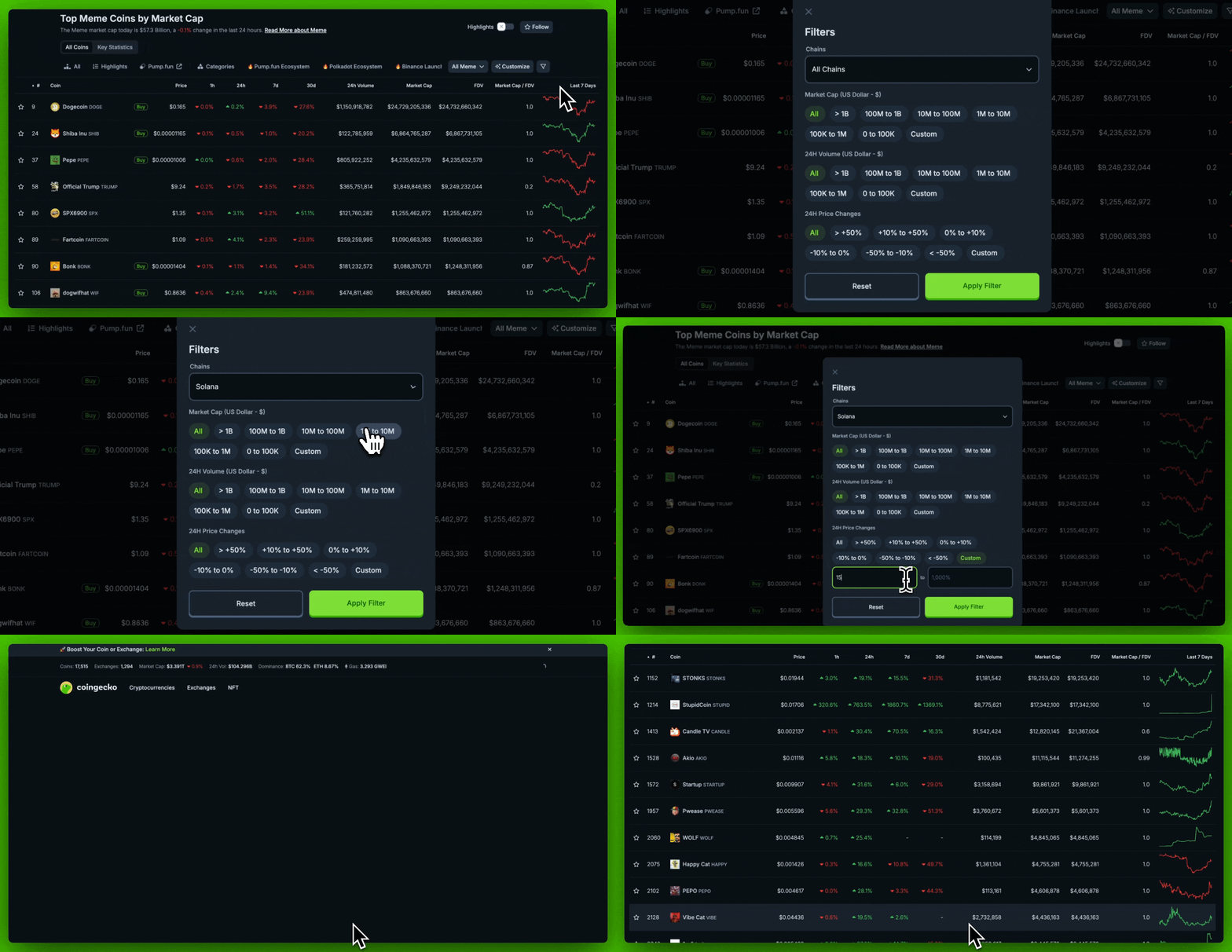 To apply filters:
-
On App: Tap Filters at the top, choose your criteria, and tap Apply Filter.
-
On Desktop: Click the filter icon (top right), select your filters, and click Apply Filter.
These customizations make it easier to find assets aligned with your interests or trading strategy.
What Are Key Stats on CoinGecko?
Key Stats offer an overview of how major categories are performing relative to the broader crypto market. It’s your entry point to understanding how different sectors are moving.
To access this feature:
-
Go to the Categories section (via app or desktop)
-
Tap or click on Key Statistics
Categories Heatmap
This heatmap is a visual representation of 24-hour price performance across sectors. Each patch represents a category:
-
Green: Net gain in past 24 hours
-
Red: Net loss
-
Size of the patch: Based on the sector’s total market cap
How to use:
-
On App: Long-press on a sector to see full details
-
On Desktop: Hover over a sector to view cap and volume
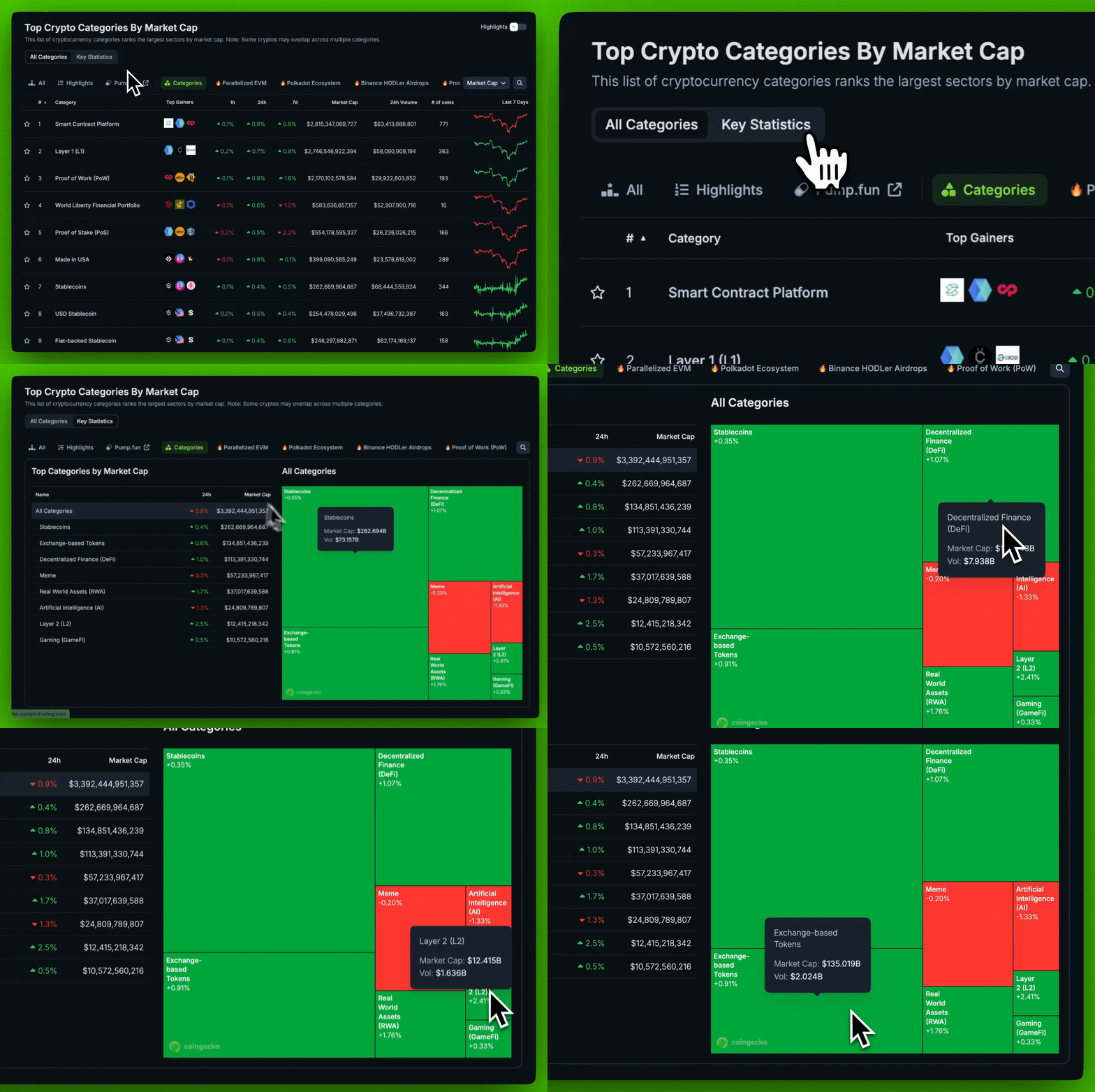 Use case: Let’s say the heatmap is mostly red, signaling a market downturn — but the RWA category stays green. This could suggest strength in the RWA narrative despite a market pullback, which may warrant deeper investigation.
This heatmap is a useful tool for spotting sector resilience, identifying contrarian trends, and guiding day-to-day analysis.
Crypto Sectors Charts
CoinGecko also offers charts that visualize how sectors move over time:
-
Crypto Sectors Market Cap Chart: Tracks the price performance of each major sector.

-
Dominance Chart: Shows each sector’s share of the total crypto market cap.
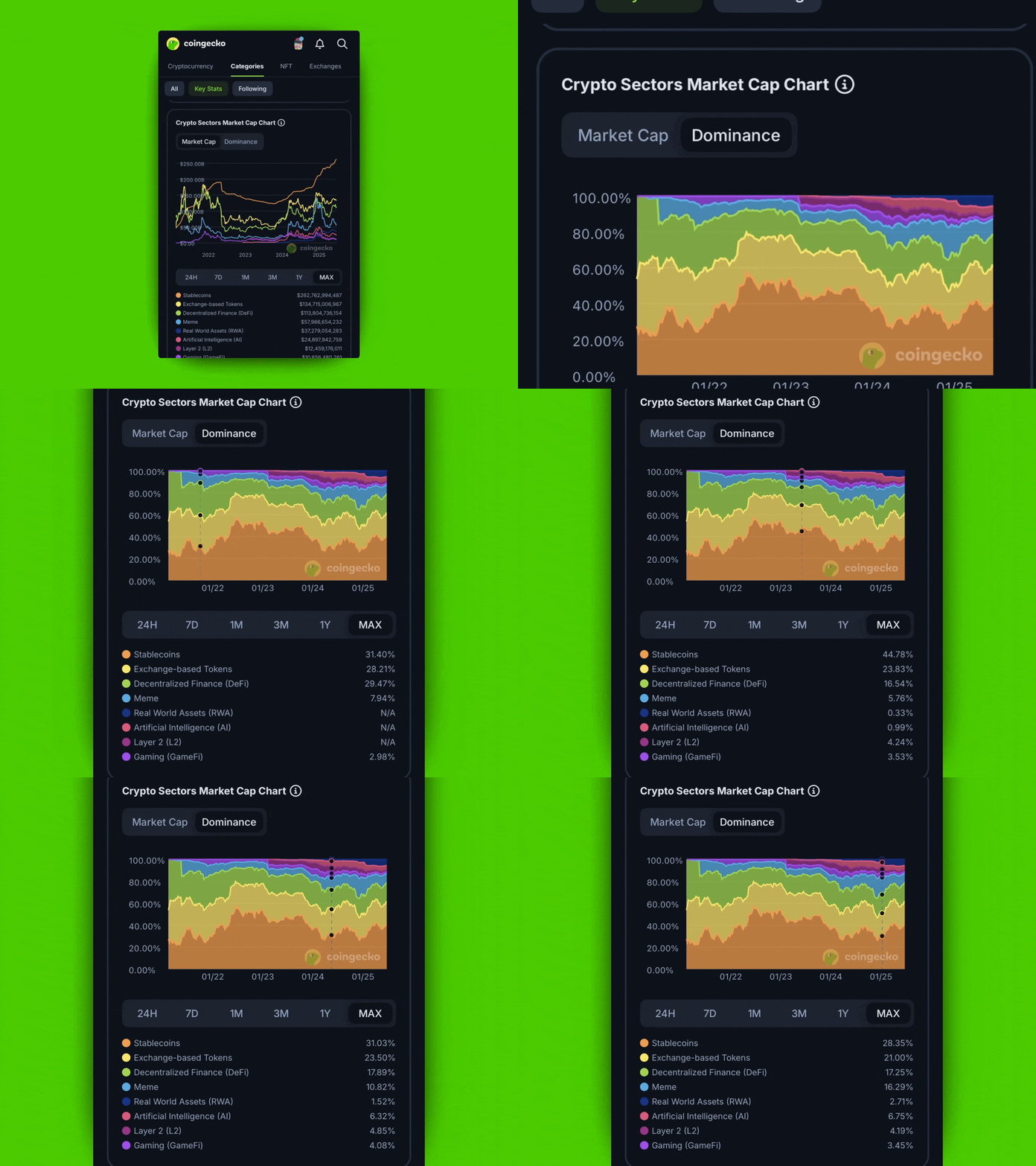
To use:
-
Select a time range (e.g., 7D, 30D, YTD)
-
On App: Long-press on any point in the chart
-
On Desktop: Hover to reveal data
These charts make it easy to compare sector strength across timeframes.
Category-Level Analysis on CoinGecko
The Category feature extends deep into each primary category. It presents data on each category to allow an in-depth understanding of general sector performance or the performance
Use cases for category-level research:
-
Compare top performers within a sector
-
Track 24h volume spikes to gauge sentiment
-
Spot rising trends based on gainers in niche sectors
Volume, price movement, and dominance charts help users identify shifts in investor sentiment and emerging narratives.
Other Useful Tools Under Key Stats
Subcategories Market Cap Chart
Some larger categories (such as Artificial Intelligence or Memecoins) are further segmented into subcategories for more granular insights. These subcategories highlight distinct micro-narratives within a broader theme. For example:
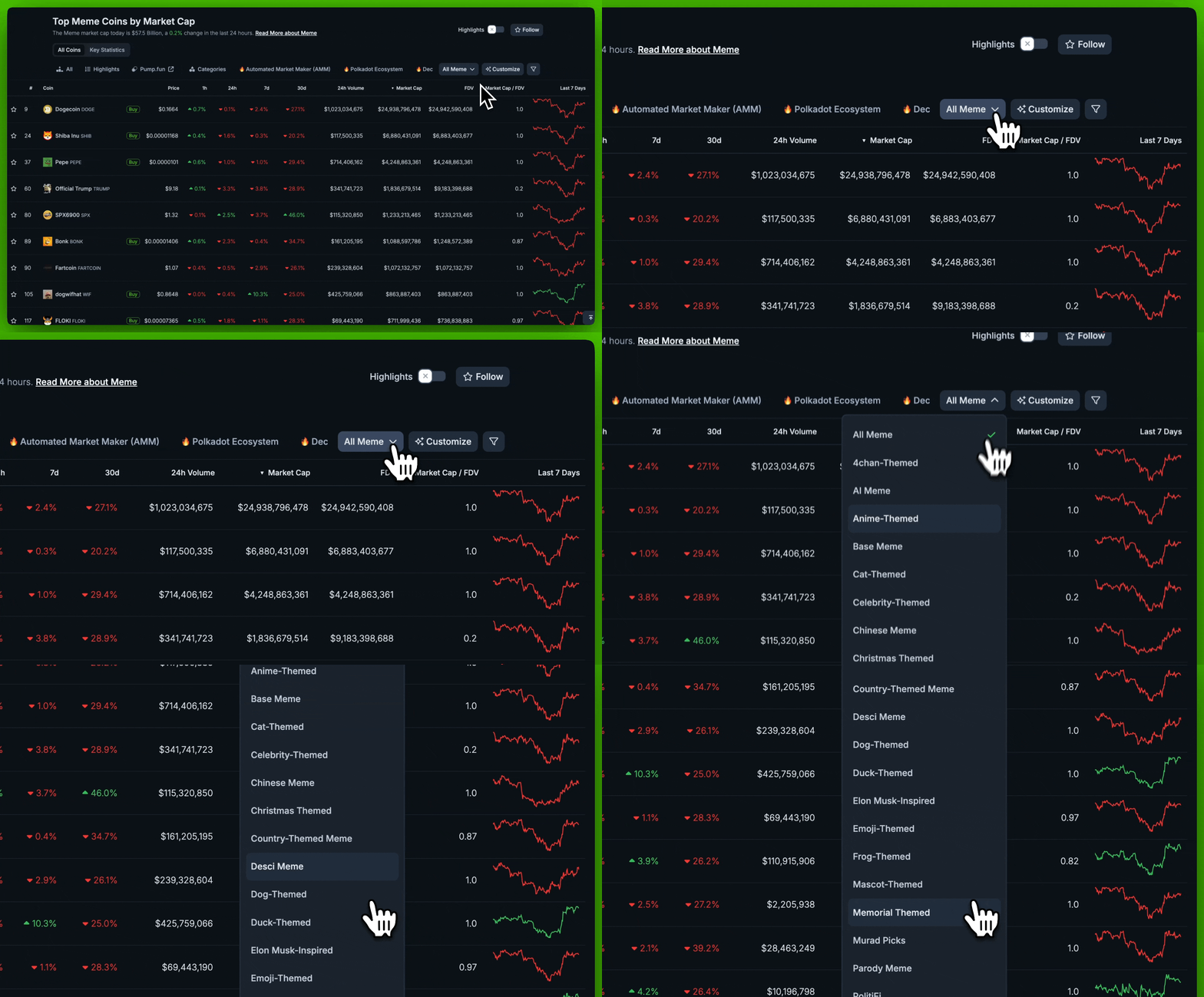
The Subcategories Market Cap Chart tracks how each subcategory’s market cap evolves over time. This helps users:
-
Compare performance between specific narratives within a sector
-
Spot emerging trends early before they gain wider attention
-
Identify growing themes driving investor interest within a larger category
It also includes a subcategory heatmap, similar to the main Categories Heatmap, but focused on sub-narratives.
Use Case: Looking at the “Artificial Intelligence” category, you might notice that AI Agent tokens outperformed other AI subcategories over the past 3 months. This could indicate increased market interest in that specific theme.
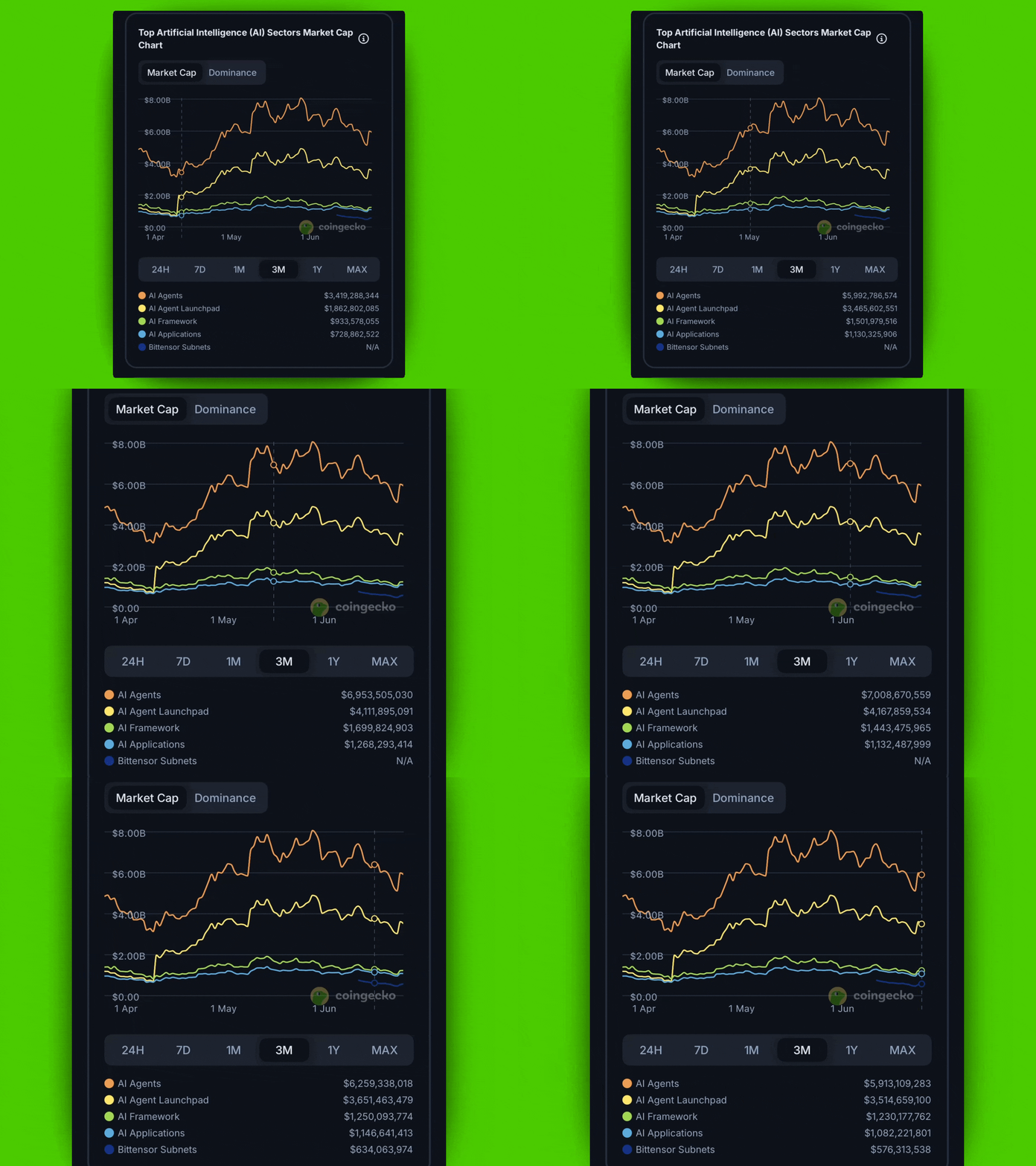
Comparing subcategory trends like this helps identify which narratives are gaining traction and which are losing momentum.
Tip: Try switching timeframes (e.g., 7D, 30D, 90D) to spot short-term vs long-term performance shifts.
Coins Market Cap Chart
This chart compares the market cap of top tokens within a category.
-
Reveals which projects dominate their sector
-
Tracks valuation changes over time
-
Includes dominance percentage
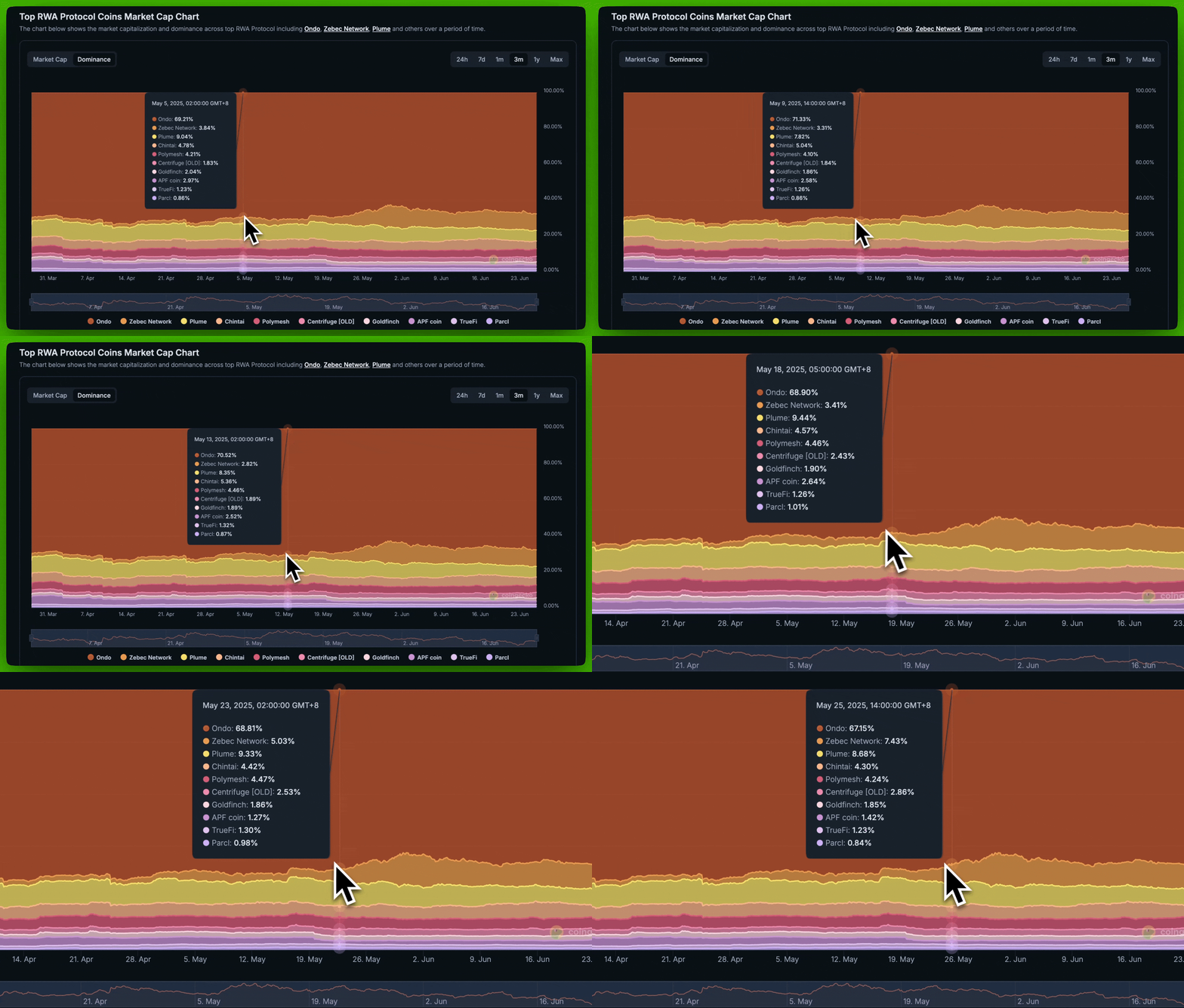
Use Case: The chart above shows how Ondo, Zebec Network, and Plume have consistently led the RWA Protocol category in dominance over time.
Coins Performance Chart
This chart tracks price movement of leading tokens in the category—helpful for performance comparisons.
Note: Price trends may not match market cap trends due to factors like token burns, unlocks, or supply increases.
Use this chart to:
-
Identify outperformers or laggards
-
Correlate price moves with broader narrative cycles
-
Spot volatility clusters or trend momentum
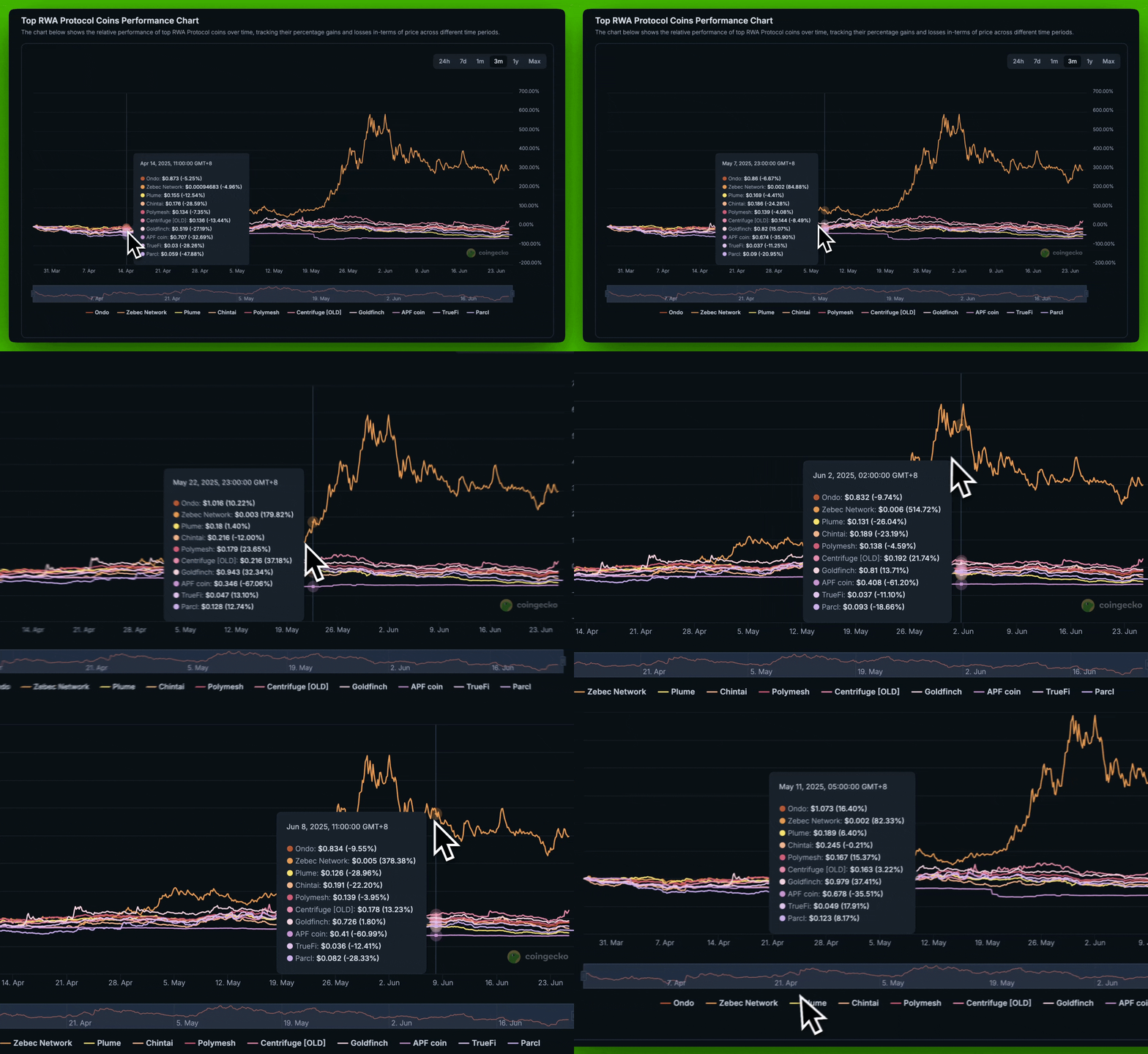 Pro tip: Use all three charts (Market Cap, Dominance, and Performance) together for more comprehensive research.
Final Thoughts
In this article, we described how investors can utilize the category feature on CoinGecko to improve their investment research process or everyday analysis. Categories place crypto assets in a compartment and define key metrics related to each compartment. This not only enables better analysis and understanding but also classifies the crypto industry into sectors. Mainstream and crypto native enthusiasts can easily discover projects in their area of interest by visiting and scrolling through associated sectors. On the other hand, it makes searching through thousands of crypto assets easier. The metrics discussed earlier in the article are available for every category. As an investor, this feature is flexible and therefore can be used differently, depending on the purpose or investment strategy.
Having said this, note that this article is only a guide for the category feature on CoinGecko and not financial advice. Featured projects are not endorsed.







 Or check it out in the app stores


