


TABLE OF CONTENTS

How to Track Tokenized Stocks & Real World Assets (RWAs) Across Solana, Ethereum, Robinhood & 200+ Chains

5.0
| by
Ru Jun Ang
-

TL;DR

  • CoinGecko API tracks tokenized stocks across major blockchains, using tokenized-stock categories for discovery and the /coins/markets endpoints to retrieve prices.

  • GeckoTerminal’s onchain endpoints provide deeper market insights, including liquidity, holder concentration, and daily OHLCV data for tokenized assets across Solana, Ethereum, Robinhood, and 200+ other chains.

Tokenized stocks such as the ones issued by xStocks, Ondo Finance, and bStocks can trade onchain across Solana, Ethereum, Robinhood, and many more chains. These tokens support continuous trading, allowing you to access price, liquidity, and trading activity at any time.

In this guide, you'll build a Python toolkit using the CoinGecko API to discover tokenized stocks, retrieve market, liquidity, holder, and historical data, and stream real-time updates via WebSockets.

How to Track Tokenized Stocks & Real World Assets (RWAs) Across Solana, Ethereum, Robinhood & 200+ Chains


What Are Tokenized Stocks and How Do You Track Them Onchain?

Tokenized stocks are blockchain tokens that represent exposure to real-world equities or ETFs. Issuers such as Backed (provider behind xStocks) hold the underlying assets and issue tokens designed to track their value, typically on a roughly 1:1 basis. These tokens are issued across multiple networks, including Solana as SPL tokens, Ethereum and other EVM-compatible chains as ERC-20 tokens, and the Robinhood chain. Because multiple issuers can tokenize the same equity across different blockchains, a single stock may exist as several distinct onchain tokens. For example, Tesla has separate tokenized versions from issuers including Backed, Ondo Finance, BTech Holdings, and Robinhood Europe.

Tesla tokenized versions from issuers from Backed, Ondo Finance, BTech Holdings, and Robinhood Europe.

Tokenized stocks offer several advantages compared to traditional equities, including 24/7 trading, fractional ownership that lowers the barrier to accessing higher-priced shares, and seamless integration with DeFi and other Web3 infrastructure. Their onchain settlement also enables them to be used as collateral, supplied to liquidity pools to earn trading fees, or deposited into lending protocols to mint stablecoins that can be staked for yield, and incorporated into decentralized applications.


Prerequisites & Setup

You'll need a CoinGecko API key. If you don't have one, follow the guide to get a free Demo API key.

Create a project folder with two files: requirements.txt lists the dependencies, and .env that stores your API key

1
2
3
4
5
6
requests
pandas
matplotlib
websocket-client
coingecko-sdk
python-dotenv

Install with pip.

pip install -r requirements.txt
1
2
COINGECKO_API_KEY=CG-your_api_key_here
COINGECKO_PLAN=demo

Next, set up a configuration module that reads your API key and plan from the environment, then builds the correct base URL and headers for each request.

1
2
3
4
5
6
7
8
9
10
11
12
13
14
15
16
17
18
19
import os
from dotenv import load_dotenv

load_dotenv()

API_KEY = os.getenv("COINGECKO_API_KEY", "")
# Switch to "pro" in your .env when you upgrade to a paid plan
PLAN = os.getenv("COINGECKO_PLAN", "demo").lower()

# Demo and paid plans use different base URLs and header names
if PLAN == "pro":
    BASE_URL = "https://pro-api.coingecko.com/api/v3"
    HEADERS = {"x-cg-pro-api-key": API_KEY}
else:
    BASE_URL = "https://api.coingecko.com/api/v3"
    HEADERS = {"x-cg-demo-api-key": API_KEY}

# Onchain (GeckoTerminal) endpoints live under the /onchain path on the same host
ONCHAIN_URL = f"{BASE_URL}/onchain"

Every endpoint in this guide can also be called using CoinGecko's official Python SDK or TypeScript SDK instead of raw HTTP requests. The SDKs handle the base URL, headers, and authentication for you.


How to Discover Tokenized Stock Tokens

CoinGecko API enables you to discover tokenized stocks using category filtering to identify relevant assets. Start with the Coins Categories List endpoint to identify category names and IDs, including xstocks-ecosystem for Backed’s xStocks, robinhood-chain-stocks-ecosystem for Robinhood’s tokenized stocks, and the broader tokenized-stock category. Pass the selected category ID to /coins/markets to retrieve token prices, market caps, and 24-hour volumes, with up to 250 tokens returned per page. Then use /coins/{id} to retrieve each token’s cross-chain contract addresses from the detail_platforms field for subsequent onchain queries.

1
2
3
4
5
6
7
8
9
10
11
12
13
14
15
16
17
18
19
20
21
22
23
24
25
26
27
28
29
30
31
32
33
34
35
36
37
38
39
40
41
42
43
44
45
46
47
48
49
50
51
52
53
54
55
56
57
58
59
60
61
62
import requests
from config import BASE_URL, HEADERS

def get_category_ids():
    url = f"{BASE_URL}/coins/categories/list"
    response = requests.get(url, headers=HEADERS)
    response.raise_for_status()
    return response.json()

# --- Optional: same request using the CoinGecko Python SDK ---
# Install it with: pip install coingecko-sdk
#
# from coingecko_sdk import Coingecko
#
# client = Coingecko(demo_api_key="YOUR_API_KEY", environment="demo")
# categories = client.coins.categories.get_list()
#
# On a paid plan, use: Coingecko(pro_api_key="YOUR_API_KEY", environment="pro")

def get_tokens_in_category(category_id):
    # per_page accepts up to 250; page through if a category is larger
    url = f"{BASE_URL}/coins/markets"
    params = {"vs_currency": "usd", "category": category_id, "per_page": 250, "page": 1}
    response = requests.get(url, headers=HEADERS, params=params)
    response.raise_for_status()
    return response.json()

# SDK equivalent: client.coins.markets.get(vs_currency="usd", category="xstocks-ecosystem")

def get_contract_addresses(coin_id):
    # tickers, market_data, community_data, and developer_data default to true
    # on this endpoint; disabling them keeps the response small
    url = f"{BASE_URL}/coins/{coin_id}"
    params = {"localization": "false", "tickers": "false", "market_data": "false",
              "community_data": "false", "developer_data": "false"}
    response = requests.get(url, headers=HEADERS, params=params)
    response.raise_for_status()
    return response.json().get("detail_platforms", {})

# SDK equivalent: client.coins.get_id("tesla-xstock", localization=False, tickers=False, market_data=False)

if __name__ == "__main__":
    # Step 1: find the category ID for the tokenized stocks you want
    categories = get_category_ids()
    for c in categories:
        if "stock" in c["category_id"]:
            print(c["category_id"], "-", c["name"])

    # Step 2: pull every token in that category, then resolve its contract addresses
    tokens = get_tokens_in_category("xstocks-ecosystem")
    rows = [
        {"symbol": t["symbol"].upper(), "coingecko_id": t["id"],
         "asset_platform": platform, "contract_address": details.get("contract_address")}
        for t in tokens[:10]
        for platform, details in get_contract_addresses(t["id"]).items()
    ]

    # Fixed-width print so columns line up regardless of address length
    print(f"{'SYMBOL':<8}{'COINGECKO_ID':<16}{'ASSET_PLATFORM':<16}{'CONTRACT_ADDRESS'}")
    print("-" * 90)
    for r in rows:
        print(f"{r['symbol']:<8}{r['coingecko_id']:<16}{r['asset_platform']:<16}{r['contract_address']}")

Running this script produces output like the following:

Output on discovering tokenized stock tokens

This same code also works for other tokenized real-world assets. Replace the category ID such as tokenized-commodities, tokenized-gold, or tokenized-exchange-traded-funds-etfs. For a deeper look at tokenized commodities, our guide on tracking gold, silver & tokenized commodities covers the topic in greater detail.

If you prefer working in spreadsheets, the same category IDs and logic work through CoinGecko's official Google Sheets and Excel add-ons. See our guides on pulling crypto prices into Google Sheets and tokenized stock prices into Excel to get started.


How to Get a Tokenized Stock's Price, Volume, and Liquidity Across Chains

CoinGecko’s aggregated market data endpoints provide price, market cap, and volume data, while GeckoTerminal provides onchain liquidity data through the same API credentials. The /coins/markets and /coins/{id} endpoints are the primary way to retrieve a tokenized stock’s price and market cap, as these figures are aggregated across all venues where the token trades. For a single token or short custom list, the /simple/price endpoint provides a simpler way to retrieve price data in a single request.

These endpoints work for any tokenized assets such as stocks, commodities, or ETF. The code below uses Tesla, Nvidia, and the S&P 500 ETF (SPYX). Simply replace the coin IDs with those identified during discovery.

1
2
3
4
5
6
7
8
9
10
11
12
13
14
15
16
17
18
19
20
21
22
23
24
import requests
from config import BASE_URL, HEADERS

def get_simple_price(coin_ids):
    # Lightweight price lookup for specific tokenized stocks by coin ID
    url = f"{BASE_URL}/simple/price"
    params = {
        "ids": ",".join(coin_ids),
        "vs_currencies": "usd",
        "include_market_cap": "true",
        "include_24hr_vol": "true",
        "include_24hr_change": "true",
    }
    response = requests.get(url, headers=HEADERS, params=params)
    response.raise_for_status()
    return response.json()

# SDK equivalent: client.simple.price.get(ids="tesla-xstock,nvidia-xstock,sp500-xstock", vs_currencies="usd", include_market_cap=True, include_24hr_vol=True, include_24hr_change=True)

if __name__ == "__main__":
    prices = get_simple_price(["tesla-xstock", "nvidia-xstock", "sp500-xstock"])
    for coin_id, data in prices.items():
        print(coin_id, f"${data['usd']:,.2f}", f"{data['usd_24h_change']:+.2f}% 24h",
              f"mcap ${data['usd_market_cap']:,.0f}", f"vol ${data['usd_24h_vol']:,.0f}")

Here is an example of how the output looks like:Output on getting tokenized stock's price, market cap, and volume data

Neither aggregated endpoint provides liquidity data, because liquidity is measured at the individual pool level. To see where a tokenized stock trades and the liquidity available on each chain, use the contract addresses from detail_platforms with the /onchain/networks/{network}/tokens/{token_address}/pools endpoint.

Tesla's contract addresses

1
2
3
4
5
6
7
8
9
10
11
12
13
14
15
16
17
18
19
20
21
22
23
24
25
26
27
28
29
30
31
32
33
34
35
36
37
38
39
40
41
42
43
44
45
46
47
48
49
50
51
52
53
54
55
56
57
58
import requests
from config import HEADERS, ONCHAIN_URL

def build_network_map():
    # e.g. "ethereum" maps to "eth", "arbitrum-one" maps to "arbitrum"
    network_map = {}
    for page in range(1, 4):
        response = requests.get(f"{ONCHAIN_URL}/networks", headers=HEADERS, params={"page": page})
        response.raise_for_status()
        for net in response.json()["data"]:
            platform = net["attributes"].get("coingecko_asset_platform_id")
            if platform:
                network_map[platform] = net["id"]
    return network_map

# SDK equivalent: client.onchain.networks.get(page=1)

def get_pools_for_token(network_id, token_address):
    # ranked by a combination of liquidity and 24-hour volume
    url = f"{ONCHAIN_URL}/networks/{network_id}/tokens/{token_address}/pools"
    response = requests.get(url, headers=HEADERS)
    response.raise_for_status()
    return response.json()["data"]

# SDK equivalent: client.onchain.networks.tokens.pools.get(token_address, network=network_id)

def get_liquidity_across_chains(detail_platforms, network_map):
    rows = []
    for asset_platform, details in detail_platforms.items():
        network_id = network_map.get(asset_platform)
        if not network_id:
            continue
        for pool in get_pools_for_token(network_id, details["contract_address"]):
            rows.append({
                "network": network_id,
                "pool": pool["attributes"]["name"],
                "pool_address": pool["attributes"]["address"],
                # GeckoTerminal returns these as strings, cast to float and round for display
                "liquidity_usd": round(float(pool["attributes"]["reserve_in_usd"]), 2),
                "volume_24h": round(float(pool["attributes"]["volume_usd"]["h24"]), 2),
            })
    return rows

if __name__ == "__main__":
    # detail_platforms comes from get_contract_addresses() in the discovery step
    tesla_platforms = {
        "solana": {"contract_address": "XsDoVfqeBukxuZHWhdvWHBhgEHjGNst4MLodqsJHzoB"},
        "ethereum": {"contract_address": "0x8ad3c73f833d3f9a523ab01476625f269aeb7cf0"},
    }
    rows = get_liquidity_across_chains(tesla_platforms, build_network_map())

    print(f"{'NETWORK':<8}{'POOL':<18}{'POOL_ADDRESS':<16}{'LIQUIDITY_USD':>14}{'VOLUME_24H':>12}")
    print("-" * 68)
    for r in rows:
        # Truncate the address for a readable print; rows still holds the full value for reuse
        addr = r["pool_address"]
        short_addr = f"{addr[:6]}...{addr[-4:]}"
        print(f"{r['network']:<8}{r['pool']:<18}{short_addr:<16}{r['liquidity_usd']:>14,.2f}{r['volume_24h']:>12,.2f}")

The response returns the following output:
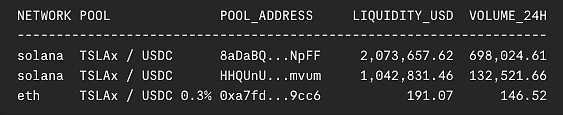
Output on getting tokenized stock's liquidity at the individual pool level

💡 Pro Tip: If you only need a token’s price and liquidity on a known chain, the /onchain/simple/networks/{network}/token_price/{addresses} endpoint returns price, 24-hour volume, 24-hour change, and total liquidity (with include_total_reserve_in_usd=true) in a single call, without requiring individual pool lookups.

How to Track Holders of a Tokenized Stock

CoinGecko’s Token Info by Token Address endpoint returns a holder snapshot, including the total holder count and a breakdown of token supply distribution among the top holders.

1
2
3
4
5
6
7
8
9
10
11
12
13
14
15
import requests
from config import HEADERS, ONCHAIN_URL

def get_holder_snapshot(network_id, token_address):
    url = f"{ONCHAIN_URL}/networks/{network_id}/tokens/{token_address}/info"
    response = requests.get(url, headers=HEADERS)
    response.raise_for_status()
    return response.json()["data"]["attributes"]["holders"]

# SDK equivalent: client.onchain.networks.tokens.info.get(token_address, network=network_id)

if __name__ == "__main__":
    holders = get_holder_snapshot("solana", "Xsc9qvGR1efVDFGLrVsmkzv3qi45LTBjeUKSPmx9qEh")  # Nvidia xStock; any tokenized stock works
    print("Total holders:", holders["count"])
    print("Distribution:", holders["distribution_percentage"])

Here is an example of how the output looks like:

Output on tracking a holder snapshot

For deeper holder, wallet, and trading analysis, the following endpoints are available on the Analyst plan and above:

1
2
3
4
5
6
7
8
9
10
11
12
13
14
15
16
17
18
19
20
21
22
23
24
25
26
27
28
29
30
31
32
33
34
35
36
37
38
39
40
41
42
43
44
45
46
47
48
49
50
51
52
import requests
from config import HEADERS, ONCHAIN_URL

def get_top_holders(network_id, token_address, limit=10):
    url = f"{ONCHAIN_URL}/networks/{network_id}/tokens/{token_address}/top_holders"
    response = requests.get(url, headers=HEADERS, params={"holders": limit})
    response.raise_for_status()
    return response.json()["data"]["attributes"]["holders"]

# SDK equivalent: client.onchain.networks.tokens.top_holders.get(token_address, network=network_id, holders="10")

def get_holders_chart(network_id, token_address, days="30"):
    url = f"{ONCHAIN_URL}/networks/{network_id}/tokens/{token_address}/holders_chart"
    response = requests.get(url, headers=HEADERS, params={"days": days})
    response.raise_for_status()
    return response.json()["data"]["attributes"]["token_holders_list"]

# SDK equivalent: client.onchain.networks.tokens.holders_chart.get(token_address, network=network_id, days="30")

def get_recent_trades(network_id, token_address, min_volume_usd=0):
    url = f"{ONCHAIN_URL}/networks/{network_id}/tokens/{token_address}/trades"
    params = {"trade_volume_in_usd_greater_than": min_volume_usd}
    response = requests.get(url, headers=HEADERS, params=params)
    response.raise_for_status()
    return response.json()["data"]

# SDK equivalent: client.onchain.networks.tokens.trades.get(token_address, network=network_id)

if __name__ == "__main__":
    # amount, percentage, and value come back as strings; round for display
    print(f"{'RANK':<6}{'ADDRESS':<16}{'AMOUNT':>14}{'PERCENTAGE':>12}{'VALUE_USD':>16}")
    print("-" * 64)
    for h in get_top_holders("solana", "Xsc9qvGR1efVDFGLrVsmkzv3qi45LTBjeUKSPmx9qEh"):
        addr = h["address"]
        short_addr = f"{addr[:6]}...{addr[-4:]}"
        pct = h["percentage"] + "%"
        value = f"${round(float(h['value']), 2):,.2f}"
        print(f"{h['rank']:<6}{short_addr:<16}{round(float(h['amount']), 2):>14,.2f}{pct:>12}{value:>16}")

    chart = get_holders_chart("solana", "Xsc9qvGR1efVDFGLrVsmkzv3qi45LTBjeUKSPmx9qEh", days="30")
    print(f"\n{'TIMESTAMP':<22}{'HOLDER_COUNT':>14}")
    print("-" * 36)
    for timestamp, holder_count in chart[-3:]:
        print(f"{timestamp:<22}{holder_count:>14}")

    print(f"\n{'KIND':<6}{'VOLUME_USD':>12}  {'TIMESTAMP':<22}{'POOL':<16}")
    print("-" * 60)
    for t in get_recent_trades("solana", "Xsc9qvGR1efVDFGLrVsmkzv3qi45LTBjeUKSPmx9qEh", min_volume_usd=1000)[:5]:
        attrs = t["attributes"]
        pool = attrs["pool_address"]
        short_pool = f"{pool[:6]}...{pool[-4:]}"
        print(f"{attrs['kind']:<6}{round(float(attrs['volume_in_usd']), 2):>12,.2f}  {attrs['block_timestamp']:<22}{short_pool:<16}")

Running this script produces output like the following:

Output on tracking holders for deeper holder, wallet and trading analysis


How to Get Historical Price and OHLCV Data for a Tokenized Stock

To retrieve historical price, market cap, and volume data for a tokenized stock, /coins/{id}/market_chart returns aggregated market data over time for tokens listed on CoinGecko, making it useful for tracking historical performance.

Note: The free Demo plan supports up to 365 days of historical data. To access a token’s full available history from its first trading date, upgrade to the Analyst plan and above.
1
2
3
4
5
6
7
8
9
10
11
12
13
14
15
16
17
18
19
20
21
22
import pandas as pd
import requests
from config import BASE_URL, HEADERS

def get_historical_price(coin_id, days="30"):
    url = f"{BASE_URL}/coins/{coin_id}/market_chart"
    params = {"vs_currency": "usd", "days": days}
    response = requests.get(url, headers=HEADERS, params=params)
    response.raise_for_status()
    return response.json()

# SDK equivalent: client.coins.market_chart.get("tesla-xstock", vs_currency="usd", days="30")

if __name__ == "__main__":
    data = get_historical_price("tesla-xstock", days="30")
    df = pd.DataFrame(data["prices"], columns=["timestamp", "price"])
    df["date"] = pd.to_datetime(df["timestamp"], unit="ms")

    print(f"{'DATE':<18}{'PRICE':>10}")
    print("-" * 28)
    for _, row in df[["date", "price"]].tail().iterrows():
        print(f"{row['date'].strftime('%Y-%m-%d %H:%M'):<18}{row['price']:>10,.2f}")

The response returns the following output:
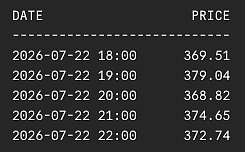
Output on getting tokenized stock's historical price

For candlestick charting, query the /onchain/networks/{network}/pools/{pool_address}/ohlcv/{timeframe} endpoint to retrieve OHLCV data for a selected pool. Resolve a token’s most liquid pool from its contract address using the /onchain/networks/{network}/tokens/{token_address}/pools endpoint. The response ranks pools by liquidity and 24-hour volume, with the first result representing the highest-ranked pool.

Each OHLCV candle includes a timestamp, open, high, low, close, and volume, allowing direct use in pandas for charting or indicator calculations. Instead of manually aggregating data, you can use timeframe and aggregate to request the candle interval needed. Each request returns up to 1,000 candles over a maximum six-month window, with before_timestamp available for retrieving older history.

1
2
3
4
5
6
7
8
9
10
11
12
13
14
15
16
17
18
19
20
21
22
23
24
25
26
27
28
29
30
31
32
33
34
35
import pandas as pd
import requests
from config import HEADERS, ONCHAIN_URL

def get_top_pool_address(network_id, token_address):
    url = f"{ONCHAIN_URL}/networks/{network_id}/tokens/{token_address}/pools"
    response = requests.get(url, headers=HEADERS)
    response.raise_for_status()
    pools = response.json()["data"]
    return pools[0]["attributes"]["address"] if pools else None  # sorted by liquidity + 24h volume, so the first is the most liquid

# SDK equivalent: client.onchain.networks.tokens.pools.get(token_address, network=network_id)

def get_pool_ohlcv(network_id, pool_address, timeframe="day", limit=30):
    url = f"{ONCHAIN_URL}/networks/{network_id}/pools/{pool_address}/ohlcv/{timeframe}"
    response = requests.get(url, headers=HEADERS, params={"limit": limit})
    response.raise_for_status()
    return response.json()["data"]["attributes"]["ohlcv_list"]

# SDK equivalent: client.onchain.networks.pools.ohlcv.get_timeframe("day", network=network_id, pool_address=pool_address, limit=limit)

if __name__ == "__main__":
    # Tesla xStock on Solana; resolve its most liquid pool from the token's contract address
    network_id, token_address = "solana", "XsDoVfqeBukxuZHWhdvWHBhgEHjGNst4MLodqsJHzoB"

    pool_address = get_top_pool_address(network_id, token_address)

    candles = get_pool_ohlcv(network_id, pool_address, timeframe="day", limit=30)
    df = pd.DataFrame(candles, columns=["timestamp", "open", "high", "low", "close", "volume"])
    df["date"] = pd.to_datetime(df["timestamp"], unit="s")

    print(f"{'DATE':<12}{'OPEN':>10}{'HIGH':>10}{'LOW':>10}{'CLOSE':>10}{'VOLUME':>14}")
    print("-" * 66)
    for _, row in df.tail().iterrows():
        print(f"{row['date'].strftime('%Y-%m-%d'):<12}{row['open']:>10,.2f}{row['high']:>10,.2f}{row['low']:>10,.2f}{row['close']:>10,.2f}{row['volume']:>14,.2f}")

Running this script produces output like the following:
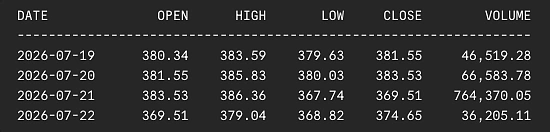
Output on getting tokenized stock's OHLCV data

Charting this response makes trends easier to interpret at a glance. The chart below plots the same pool OHLCV data retrieved by get_pool_ohlcv():

Chart below plots the OHLCV data (candlestick)To simplify your workflow, you can skip the pool-resolution step entirely and query OHLCV data directly by token contract using the Token OHLCV Chart by Token Address endpoint. It supports the same timeframe, aggregate, limit, and before_timestamp parameters.

Note: This endpoint is available exclusively on the Analyst plan and above.

With this same OHLCV data, you can go beyond plotting it and calculate technical indicators such as RSI, MACD, and Bollinger Bands. Our guide on automating crypto technical analysis with Python walks through the setup in detail.

Subscribe to CoinGecko now to access full historical price data!


How to Stream Tokenized Stock Prices, OHLCV, and Trades via Websockets

CoinGecko's WebSocket streams real-time tokenized stock data by maintaining a persistent connection and pushing updates as they happen, instead of cached snapshots with REST API polling. It provides live price, trade, and candlestick updates with ultra-low latency, making it ideal for real-time dashboards, trading applications, and monitoring fast-moving tokenized assets.

Note: The WebSocket is available exclusively on the Analyst plan and above.

Connect to wss://stream.coingecko.com/v1 with your API key, then subscribe to the channels and specify the tokens or pools you want to monitor. The example below subscribes to CGSimplePrice, OnchainOHLCV, and OnchainTrade in a single connection, streaming Tesla xStock's aggregated price, live candlesticks, and pool-level swaps on Solana all at once.

1
2
3
4
5
6
7
8
9
10
11
12
13
14
15
16
17
18
19
20
21
22
23
24
25
26
27
28
29
30
31
32
33
34
35
36
37
38
39
40
41
42
43
44
45
46
47
48
49
50
51
52
53
54
55
import json
import websocket
from config import API_KEY

NETWORK_ID = "solana"
POOL_ADDRESS = "8aDaBQkTrS6HVMjyc6EZebgdiaXhLYGriDWKWWp1NpFF"  # Tesla xStock / USDC
COIN_ID = "tesla-xstock"

def on_open(ws):
    # Subscribe to all three channels, then tell each one what to watch
    for channel in ("CGSimplePrice", "OnchainOHLCV", "OnchainTrade"):
        ws.send(json.dumps({"command": "subscribe", "identifier": json.dumps({"channel": channel})}))

    ws.send(json.dumps({
        "command": "message",
        "identifier": json.dumps({"channel": "CGSimplePrice"}),
        "data": json.dumps({"coin_id": [COIN_ID], "vs_currencies": ["usd"], "action": "set_tokens"}),
    }))
    ws.send(json.dumps({
        "command": "message",
        "identifier": json.dumps({"channel": "OnchainOHLCV"}),
        "data": json.dumps({
            "network_id:pool_addresses": [f"{NETWORK_ID}:{POOL_ADDRESS}"],
            "interval": "1m",
            "token": "base",
            "action": "set_pools",
        }),
    }))
    ws.send(json.dumps({
        "command": "message",
        "identifier": json.dumps({"channel": "OnchainTrade"}),
        "data": json.dumps({
            "network_id:pool_addresses": [f"{NETWORK_ID}:{POOL_ADDRESS}"],
            "action": "set_pools",
        }),
    }))

def on_message(ws, message):
    data = json.loads(message)
    # OnchainTrade payloads carry "ty" (b/s); OnchainOHLCV uses "ch" for channel type
    # (not "c"); CGSimplePrice uses "c":"C1". Checking in this order avoids key collisions.
    if "ty" in data:
        side = "BUY" if data["ty"] == "b" else "SELL"
        print(f"[TRADE] {side} {data['vo']:.2f} USD at ${data['pu']:.2f}  tx={data['tx'][:10]}...")
    elif "ch" in data:
        print(f"[OHLCV] {data['i']} candle  O:{data['o']:.2f} H:{data['h']:.2f} L:{data['l']:.2f} C:{data['c']:.2f}")
    elif data.get("c") == "C1":
        print(f"[PRICE] {data['i']} ${data['p']:.2f}  {data['pp']:+.2f}% 24h")
    else:
        print("Status:", data.get("message", data))

if __name__ == "__main__":
    url = f"wss://stream.coingecko.com/v1?x_cg_pro_api_key={API_KEY}"
    ws = websocket.WebSocketApp(url, on_open=on_open, on_message=on_message)
    ws.run_forever()

The response returns the following output:

Output on streaking tokenized stock prices, OHLCV, and trades via CoinGecko's Websockets

This same feed is visualized in real time on GeckoTerminal's TSLAX pool:

Shows GeckoTerminal's TSLAX pool via CoinGecko's Websockets

Learn more about CoinGecko's WebSocket


Conclusion

With CoinGecko API, you can build a Python workflow for tracking tokenized stocks across the full data lifecycle from discovering assets and retrieving market data to mapping liquidity pools, analyzing holders, fetching historical data, and streaming real-time updates across various chains.

The same workflow extends to other tokenized real-world assets. You can swap the category ID to track tokenized commodities, treasuries, or ETFs, allowing a single codebase to support a broader range of RWA assets as more markets move onchain.

To build a user-facing application with this data, explore our guide on building a crypto portfolio dashboard in Python. For deeper holder analysis, our token holders deep dive covers concentration metrics in more detail.

Ready to start building? Get your free Demo API key and start exploring tokenized stock data today. As your needs grow, upgrade to a CoinGecko API Analyst plan to access the full suite of data delivery methods, including REST APIs, webhook, and WebSocket streams, along with exclusive endpoints, higher API call credits and rate limits.

CoinGecko's Content Editorial Guidelines
CoinGecko’s content aims to demystify the crypto industry. While certain posts you see may be sponsored, we strive to uphold the highest standards of editorial quality and integrity, and do not publish any content that has not been vetted by our editors.
Learn more
Want to be the first to know about upcoming airdrops?
Subscribe to the CoinGecko Daily Newsletter!
Join 600,000+ crypto enthusiasts, traders, and degens in getting the latest crypto news, articles, videos, and reports by subscribing to our FREE newsletter.
Tell us how much you like this article!
Vote count: 1
Ru Jun Ang
Ru Jun Ang
Ru Jun is a growth marketer who’s curious about crypto, APIs, and the technology behind digital assets, with a focus on market data, on-chain trends, and products shaping the Web3 space.

More Articles

Select Currency
Suggested Currencies
USD
US Dollar
IDR
Indonesian Rupiah
TWD
New Taiwan Dollar
EUR
Euro
KRW
South Korean Won
JPY
Japanese Yen
RUB
Russian Ruble
CNY
Chinese Yuan
Fiat Currencies
AED
United Arab Emirates Dirham
ARS
Argentine Peso
AUD
Australian Dollar
BDT
Bangladeshi Taka
BHD
Bahraini Dinar
BMD
Bermudian Dollar
BRL
Brazil Real
CAD
Canadian Dollar
CHF
Swiss Franc
CLP
Chilean Peso
CZK
Czech Koruna
DKK
Danish Krone
GBP
British Pound Sterling
GEL
Georgian Lari
HKD
Hong Kong Dollar
HUF
Hungarian Forint
ILS
Israeli New Shekel
INR
Indian Rupee
KWD
Kuwaiti Dinar
LKR
Sri Lankan Rupee
MMK
Burmese Kyat
MXN
Mexican Peso
MYR
Malaysian Ringgit
NGN
Nigerian Naira
NOK
Norwegian Krone
NZD
New Zealand Dollar
PHP
Philippine Peso
PKR
Pakistani Rupee
PLN
Polish Zloty
SAR
Saudi Riyal
SEK
Swedish Krona
SGD
Singapore Dollar
THB
Thai Baht
TRY
Turkish Lira
UAH
Ukrainian hryvnia
VEF
Venezuelan bolívar fuerte
VND
Vietnamese đồng
ZAR
South African Rand
XDR
IMF Special Drawing Rights
Cryptocurrencies
BTC
Bitcoin
ETH
Ether
LTC
Litecoin
BCH
Bitcoin Cash
BNB
Binance Coin
EOS
EOS
XRP
XRP
XLM
Lumens
LINK
Chainlink
DOT
Polkadot
YFI
Yearn.finance
SOL
Solana
Bitcoin Units
BITS
Bits
SATS
Satoshi
Commodities
XAG
Silver - Troy Ounce
XAU
Gold - Troy Ounce
Select Language
Popular Languages
EN
English
RU
Русский
DE
Deutsch
PL
język polski
ES
Español
VI
Tiếng việt
FR
Français
PT-BR
Português
All Languages
AR
العربية
BG
български
CS
čeština
DA
dansk
EL
Ελληνικά
FI
suomen kieli
HE
עִבְרִית
HI
हिंदी
HR
hrvatski
HU
Magyar nyelv
ID
Bahasa Indonesia
IT
Italiano
JA
日本語
KO
한국어
LT
lietuvių kalba
NL
Nederlands
NO
norsk
RO
Limba română
SK
slovenský jazyk
SL
slovenski jezik
SV
Svenska
TH
ภาษาไทย
TR
Türkçe
UK
украї́нська мо́ва
ZH
简体中文
ZH-TW
繁體中文
Welcome to CoinGecko
Welcome back!
Login or Sign up in seconds
or
Sign in with . Not you?
Forgot your password?
Didn't receive confirmation instructions?
Resend confirmation instructions
Password must contain at least 8 characters including 1 uppercase letter, 1 lowercase letter, 1 number, and 1 special character
By continuing, you acknowledge that you've read and agree fully to our Terms of Service and Privacy Policy.
Get Price Alerts with CoinGecko App
Forgot your password?
You will receive an email with instructions on how to reset your password in a few minutes.
Resend confirmation instructions
You will receive an email with instructions for how to confirm your email address in a few minutes.
Get the CoinGecko app.
Scan this QR code to download the app now App QR Code Or check it out in the app stores
Add NFT
CoinGecko
Better on the app
Real-time price alerts and a faster, smoother experience.